noticeCOVID-19 UPDATE ASO World entire team is working remotely. we expect no disruptions in our ASO services.
Browser close
50% OFF FIRST ORDER
Referral Program
bonusprogram
50% OFF FIRST ORDER
Referral Program
bonusprogram
logo
  • App Promotion
    Keyword Installs
    Package (Direct) Installs
    Ratings & Reviews
    Guaranteed Reviews Service
    Guaranteed Keyword Ranking Service
    ASO Service
    Customized Solution
    More Services
  • ASO Tools
    Free ASO Tools
    Keyword Research Tools
    How to Pick Keywords
    promote
    Restore App Credibility with Review Optimization
    Low ratings cost you users every day. Restore your app's credibility and convert more downloads with expert review optimization strategies.
  • Solutions
    By vertical
    Sports
    HOT
    AI
    Health & Fitness
    Ecommerce
    Fintech
    HOT
    Gaming
    Education
    Dating
    HOT
    Entertainment
    Travel
    Social Media
    Restaurant & Foodtech
    Productivity
    Lifestyle
    Music
    Utility
    Photo & Video
    Casino
    Business
    News
    NEW
    By Performance
    Seasonal & Event Marketing
    NEW
    FIFA World Cup 2026 App Growth
    HOT
    App Reputation & Negative Reviews Management
    Boost App Rankings & User Acquisition
    Improve Organic Conversions & User Experience
    Mobile App Launch Marketing
    Increase Keyword Rankings & Organic Downloads
    solution-suffix
    Customer Stories
    Explore inspiring Customer Stories to see how businesses like yours have successfully leveraged ASO World to create powerful mobile apps.
    how-to-pick-keywords
    How to Pick the Right Keywords for App Store & Google Play
    A research-to-ranking framework for finding, grouping and validating the keywords that turn store search into real installs — then a safe execution plan for getting them ranked.
  • ASO Academy
    Blog
    Case Studies
    Guides & Insights
    FAQs
    Glossary
    promote
    Restore App Credibility with Review Optimization
    Low ratings cost you users every day. Restore your app's credibility and convert more downloads with expert review optimization strategies.
    promote
    How to Write App Descriptions for AI Search and App Store Optimization?
    Learn how to write AI-ready app descriptions that improve App Store Optimization, support AI search discovery, and increase app visibility and conversions.
  • Pricing
Login Register
logo
  • App Promotion
    Keyword Installs
    Package (Direct) Installs
    Ratings & Reviews
    Guaranteed Reviews Service
    Guaranteed Keyword Ranking Service
    ASO Service
    Customized Solution
    More Services
  • ASO Tools
  • Solutions
    By vertical
    Sports
    AI
    Health & Fitness
    Ecommerce
    Fintech
    Gaming
    Education
    Dating
    Entertainment
    Travel
    Social Media
    Restaurant & Foodtech
    Productivity
    Lifestyle
    Music
    Utility
    Photo & Video
    Casino
    Business
    News
    By Performance
    Seasonal & Event Marketing
    FIFA World Cup 2026 App Growth
    App Reputation & Negative Reviews Management
    Boost App Rankings & User Acquisition
    Improve Organic Conversions & User Experience
    Mobile App Launch Marketing
    Increase Keyword Rankings & Organic Downloads
  • ASO Academy
    Blog
    Case Studies
    Guides & Insights
    FAQs
    Glossary
  • Pricing
Important Notice
Important Notice:Beware of scams using ASOWorld's name for part-time recruitment or ASO earning app activities. ASOWorld is not hiring any part-time staff. Trust only official information posted by ASOWorld.
Close the Important Notice

ASO Case Study: How a Productivity App Broke Its Page-One Ceiling and Locked 9 Keywords into Top 1–2

How a productivity app stuck at rank 10 pushed 9 keywords to Top 1–2 in 3 days and held them 2+ months. Full keyword install process and results.

Posted: Yesterday

Home Case Studies Productivity App Case Studies ASO Case Study: How a Productivity App Broke Its Page-One Ceiling and Locked 9 Keywords into Top 1–2

In twitter faceBook

This productivity app was already ranked around position 10 for most of its target keywords — visible, but invisible where it counted. Here is the exact keyword optimization process that moved those terms to Top 1–2 and held them for more than two months.


Optimization Results

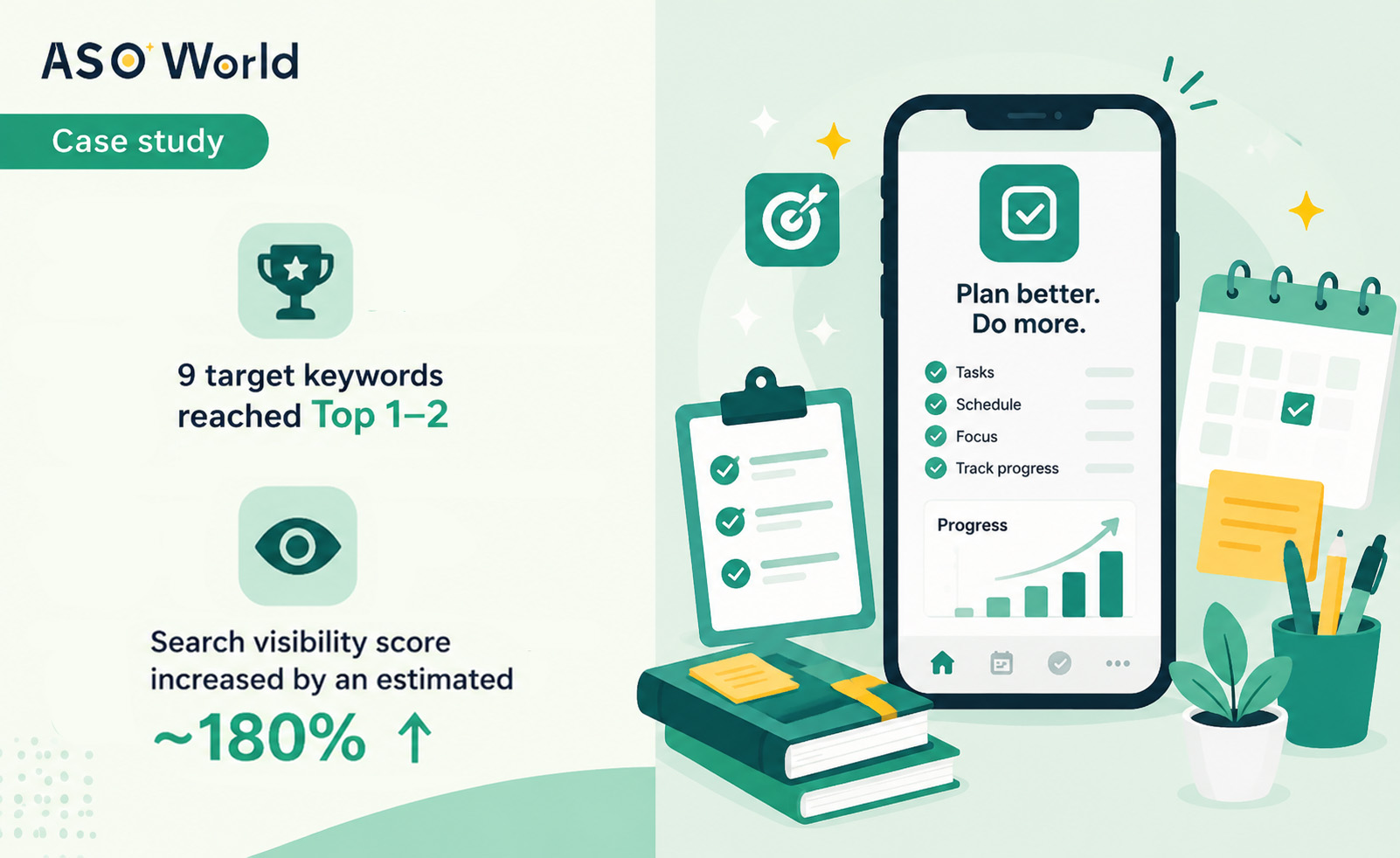
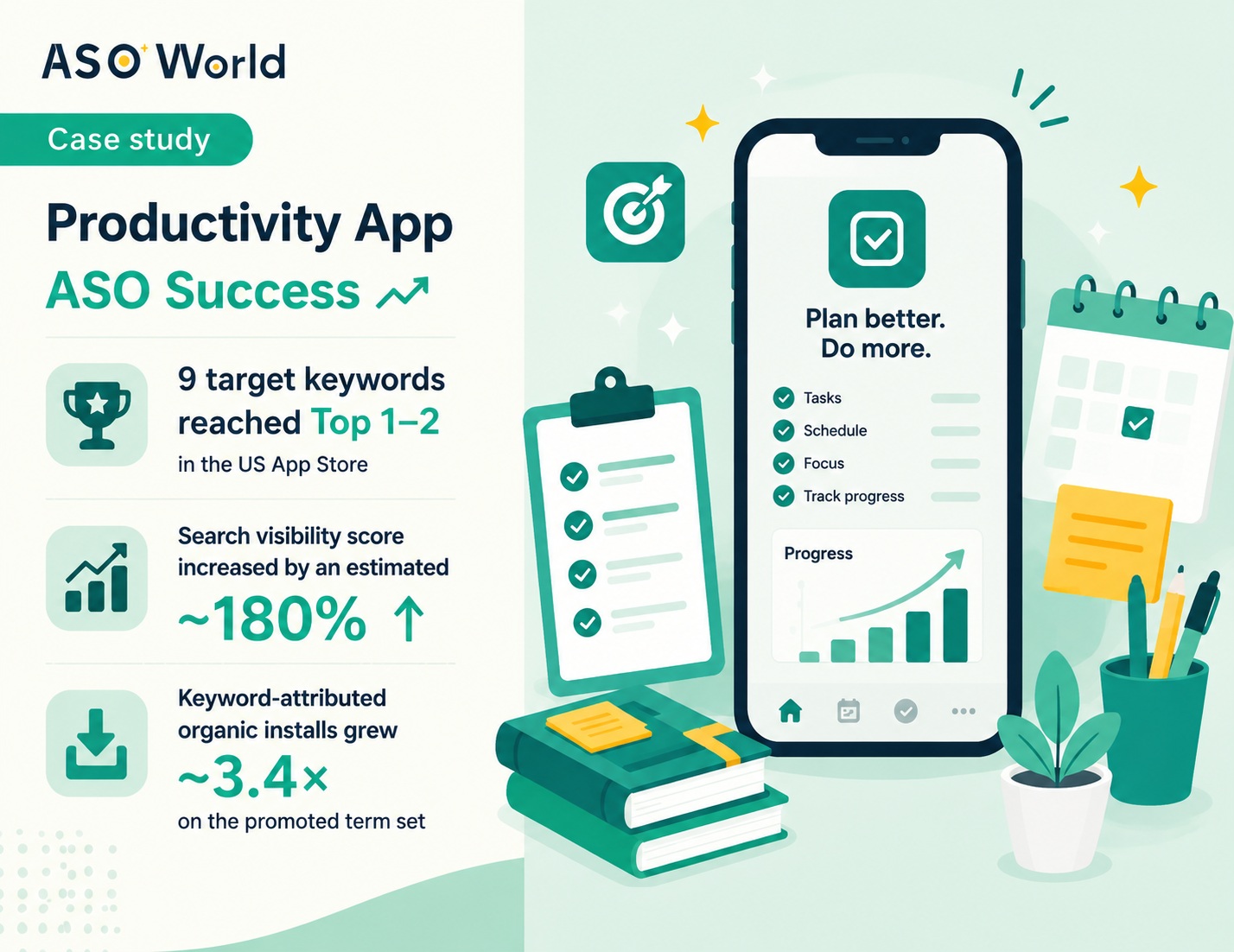
  • 9 target keywords reached Top 1–2 in the US App Store
  • Search visibility score increased by an estimated ~180%, driven by the move from page-one-mid to the top two result slots.
  • Keyword-attributed organic installs grew ~3.4× on the promoted term set, as tap share consolidated into the first two results.


Most ASO case studies start from zero — an unindexed app with no coverage and no traffic. This one doesn't. This client was already doing a lot right: they had real keyword coverage, most of their target terms sat around position 10, and they were pulling steady impressions from App Store search. Their problem was subtler and, frankly, more common: they had hit the page-one ceiling.


Ranking 8th, 10th or 12th for a keyword feels like progress. It looks fine in a dashboard. But in App Store search, the gap between position 10 and position 1 is not incremental — it's the difference between being technically findable and actually being chosen. This is the story of how we closed that gap on nine keywords, and kept it closed.


Client Profile

Our client is an established productivity app in the US App Store — a task and workflow management tool used mainly by working professionals and small teams. Unlike an early-stage app, they arrived with a genuinely healthy foundation: a mature metadata setup, an existing base of ratings, and keyword coverage across several dozen relevant search terms. Roughly a dozen of those terms were already ranking around position 10, generating a consistent flow of search impressions.


In other words, they had already won the hard part that most apps never finish: they were indexed, covered, and visible. What they hadn't won was the top of the results page.


Industry

Productivity
 

Target Market

United States
 

Platform

iOS App Store
 

App Stage

Established — already ranked, seeking breakthrough
 

ASO Service Used

Keyword Installs


The Challenge

The client came to us with a frustration many mature apps will recognise. Their ASO work had plateaued at the exact point where it should have started paying off.

1. Page one wasn't converting like page one. Sitting around position 10 meant appearing at the very bottom of the visible results — or requiring a scroll. Impressions looked acceptable, but the tap-through rate on those impressions was a fraction of what the top slots were pulling. In App Store search, the first two results absorb the overwhelming majority of taps for any given term; everything below competes for the remainder.


2. Metadata optimization had run out of room. They had already refined their title, subtitle and keyword field, and had followed the sort of field-mapping discipline we outline in our guide on how to pick the right app keywords. Those changes had earned them coverage and mid-page rankings — and then stopped producing gains. This is expected: metadata determines whether you can rank for a term. It does not determine where you land within the eligible pool.


3. They were stuck behind entrenched competitors. The top slots for their core terms were held by well-known productivity apps with years of accumulated ranking authority. Waiting for organic momentum to overtake them was not a realistic plan on any useful timeline.


4. Previous gains hadn't held. An earlier attempt at a short promotional burst had produced a brief ranking spike that decayed within days. They needed positions that would stay, not a spike to screenshot.

 
The correct diagnosis: this was not a coverage problem — it was a ranking problem. Store search works in two distinct stages: coverage decides whether your app is eligible to appear for a term at all, and ranking decides where you sit inside that eligible pool. Confusing the two is the single most common reason keyword campaigns underperform. Because this client already had coverage, they didn't need indexing work — they needed install signal directed at positions they already held.
 

The ASO Solution: The Full Keyword Optimization Process

Everything below is what we actually did, in order. Because the entire growth story here rests on keyword rankings, we've documented the complete keyword workflow — selection, auditing, allocation, pacing, delivery and defence — rather than listing generic best practices.


Step 1
Audit the Existing Keyword Set — Separate Coverage from Ranking

We started with the client's current ranking data rather than a blank keyword list. This is a different starting point than a new app requires, and it changes the whole plan.


Using ASOWorld's keyword ranking tools, we pulled every term the app currently had coverage for and tagged each one:

  • Covered and close (Rank 3–15): already inside striking distance of the top. These are the highest-ROI targets in all of ASO — the algorithm already accepts the app as a relevant answer for the term, so install signal has an existing position to lift rather than a position to create.
  • Covered but distant (Rank 16–250): eligible, but requiring far more signal per position gained. Deferred to a later phase.
  • Zero coverage (outside Top 250): excluded entirely from this campaign. There is no position for install signal to push, so spend here would have been wasted. Terms in this bucket belong in a metadata or guaranteed ranking workflow instead.


That audit immediately reframed the campaign. The client had been thinking about "improving ASO" broadly. The data said something much narrower: there were roughly a dozen terms sitting at the edge of the top, and those were the entire opportunity.


💡 Expert Insight: For an app that already ranks, the most expensive mistake is spreading budget evenly across the whole keyword list. Positions 3–15 convert install signal into rank movement far more efficiently than positions 50+, because the app has already cleared the store's relevance threshold. Sort by current rank before you sort by search volume.
 

Step 2
Score and Shortlist — Volume, Difficulty and Chance Together

From that shortlist we scored each candidate on the three dimensions we use for every keyword decision, as covered in our keyword selection guide:

  • Volume — real monthly search demand for the term inside the store.
  • Difficulty — how entrenched the apps currently holding the top results are.
  • Chance — how likely this specific app was to break into the top for that term, given its existing rank and rating base.


The client's instinct was to put everything behind the two highest-volume head terms in their category. We advised against it, and the reasoning matters: those two terms were dominated by category leaders who had held the top slots for years, and concentrating budget on them would have produced a smaller, less durable result than spreading across a wider set of achievable terms.


Instead we finalised 9 keywords for the first campaign — a mix of core terms describing what the app fundamentally is, and longer-tail phrases capturing specific workflow and feature intent. All nine shared one trait: an existing rank close enough to the top that a realistic volume of install signal could close the distance.


💡 Expert Insight: We recommend promoting at least 10 keywords in a plan rather than 1–2. A portfolio pulls traffic from many terms at once, so a single ranking swing can't sink your visibility — and it looks materially more natural to the store algorithm than all signal pointing at one phrase. Nine terms with a strong existing base was the right shape here; two head terms would not have been.


Step 3
Set Volume per Keyword — Sized to the Gap, Not to the Budget

This is where most self-managed campaigns go wrong. Volume was calculated per keyword, based on the distance each term needed to travel and how contested its top slots were — not by dividing a total budget by nine.


The resulting allocation was deliberately modest and tightly bounded:

  • 20 installs per day for the majority of keywords — those needing a lift of roughly 1–5 positions.
  • 25 installs per day for the single most contested term, which required the largest climb.
  • 3-day continuous cycles per keyword, with volume split evenly across all three days rather than front-loaded.


Two rules governed these numbers. First, keyword installs were kept well within 30% of the app's total daily installs — the ceiling we hold to in order to keep the delivery pattern proportionate to the app's genuine organic baseline. Second, volumes were kept flat and even day over day, producing a steady signal rather than a spike. An app already receiving organic traffic doesn't need a surge to move; it needs consistency the algorithm can read as sustained demand.


Why 3 days, not 1: the Apple algorithm reacts to velocity, and you may see ranking updates in around three days. But single-day bursts are exactly what produces the spike-then-drop pattern the client had already experienced. Continuous multi-day orders establish the ranking and give it enough sustained signal to hold once delivery ends. Every keyword in this campaign ran a minimum of three consecutive days.
 

Step 4
Build the Campaign in the Dashboard

With the plan settled, execution followed the standard campaign setup flow:

  1. Add the app and market — the app was added via its store URL with the United States set as the target region.
  2. Select the service — Keyword Installs, the correct choice for an app that already holds coverage and needs to climb.
  3. Import the keyword list — all nine terms were pulled directly from the research and recommendation tools into the order console rather than typed in, eliminating input errors on exact-match phrases. A single misspelled keyword sends an entire day's volume to a term nobody searches.
  4. Allocate daily volume — one-click allocation filled the per-keyword daily volumes across the three-day window, and the multi-day trend planner shaped the delivery curve in one pass instead of nine separate configurations.
  5. Review in preview, then launch — the preview panel showed all nine keywords, all three days, and every daily volume in one view for a final check before delivery started.


Step 5
Track Delivery Against Ranking, Daily

Once live, we monitored delivery and rank movement side by side on the same timeline — install volume delivered per keyword per day, against that keyword's rank change. That pairing is what makes a campaign diagnosable: it shows whether a keyword is failing because it needs more signal, or because the target was wrong to begin with.


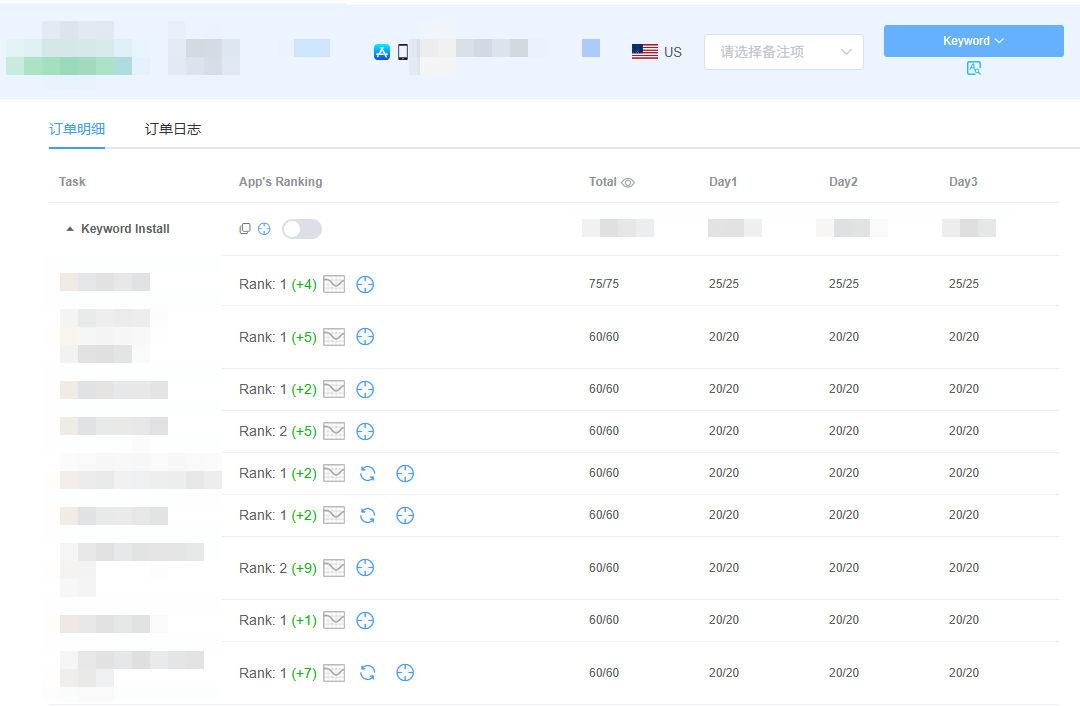
Delivery ran clean. Every task completed at 100% — 75/75 on the highest-volume term and 60/60 across the rest, split evenly at 25/25/25 and 20/20/20 per day. No under-delivery, no catch-up spikes, no gaps in the pipeline.


ASOWorld dashboard showing 9 keyword install tasks, each fully delivered, with app rankings at Rank 1 or Rank 2 and position gains from +1 to +9


Read that ranking column carefully, because it's the clearest illustration of why this app was such a good fit for keyword installs. A +1 gain means a keyword that was already sitting at Rank 2 and simply needed a nudge to take the top slot. A +9 gain means a term around position 10 — precisely the client's plateau — carried all the way to the top on 60 installs delivered over three days. Neither of those outcomes is available to an app without existing coverage. The starting position is the leverage.


Step 6
Confirm the Rankings Held

Reaching Rank 1 is the easier half of the job. Staying there is what determines whether a campaign was worth running, and it's where the client's previous attempt had failed.


After delivery concluded, we kept tracking the promoted terms without further spend. The rankings did not decay.


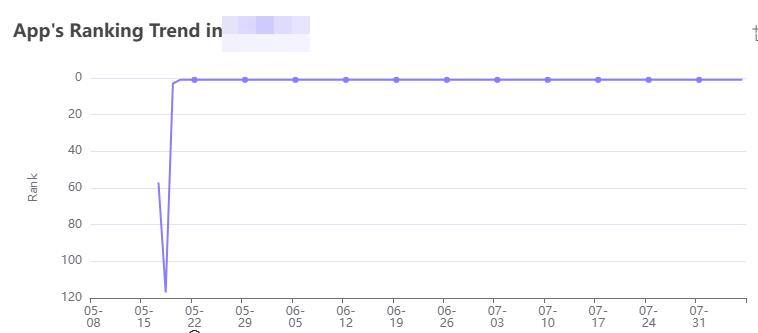
Ranking trend chart showing a keyword moving from around position 60 to position 1 in mid-May and holding that position flat through the end of July


That flat line is the most important image in this case study. It shows the ranking becoming self-sustaining. Once the app occupied the top slot, it captured the tap share that comes with the top slot — and those genuine organic installs supplied the ongoing signal the position needed. The campaign didn't rent the ranking; it moved the app into a position its own organic performance could defend.


💡 Expert Insight: Durability is where the difference between a covered app and an uncovered one shows up most starkly. An app with weak retention and no organic base will slide back down once delivery stops, because nothing sustains the position. This client had solid retention and real usage — so the top ranking fed itself. If your app already converts and retains well, you are in the best possible position for keyword installs to produce lasting gains rather than temporary ones.
 

Key Takeaways

If your app is already ranking but stalled outside the top few results, this case maps closely onto your situation. Four things made the difference:

  1. Diagnose coverage versus ranking before spending anything. Covered keywords sitting at positions 3–15 are the most efficient targets in ASO. Zero-coverage keywords need a completely different service. Sorting your list this way costs nothing and determines whether your budget works.
  2. Don't put everything behind one head term. Nine achievable keywords beat two entrenched ones — for total traffic, for durability, and for how natural the campaign looks to the algorithm.
  3. Size volume to the ranking gap, and keep pacing even. Modest, evenly distributed volume across a continuous multi-day cycle outperforms a large single-day burst, and it's what prevents the spike-and-drop pattern.
  4. Existing organic quality is what makes rankings stick. A top position generates real installs, and real installs defend the position. Retention and conversion aren't separate from your keyword strategy — they're what makes it hold.

The uncomfortable truth for a lot of well-run apps is that the work required to reach position 10 is not the work required to reach position 1. Metadata gets you eligible. Install signal decides where you land. If you've already done the first part properly, the second part is a much smaller job than it looks — as nine keywords and 555 installs demonstrated here.

SHARE THIS POST

In twitter faceBook
Start Your Store Ranking Acquisition Capability Detection
Step by step to measure all of your app store optimization efforts with our ASO tools.
Table of contents

    Categories

    • Games Growth Case Studies
    • Health & Fitness Apps Case Studies
    • Video Apps Case Studies
    • Dating Apps Case Studies
    • Social Apps Case Studies
    • Shopping Apps Case Studies
    • Food & Drink Apps Case Studies
    • Education App Case Studies
    • Productivity App Case Studies
    • Utility App Case Studies
    • Fintech App Case Studies
    • Lifestyle App Case Studies
    • Magazines & Newspapers App Case Studies
    • Travel Apps Case Studies
    • Sports App Case Studies
    • Business App Case Studies

    Related Cases that help you grow

    ASO Case Study: How a Productivity App Broke Its Page-One Ceiling and Locked 9 Keywords into Top 1–2
    Productivity App Case Studies

    ASO Case Study: How a Productivity App Broke Its Page-One Ceiling and Locked 9 Keywords into Top 1–2

    How a productivity app stuck at rank 10 pushed 9 keywords to Top 1–2 in 3 days and held them 2+ months. Full keyword install process and results.
    ASO Case Study: How a Social App Captured Summer Traffic and Achieved a 152% Increase in Organic Installs
    Social Apps Case Studies

    ASO Case Study: How a Social App Captured Summer Traffic and Achieved a 152% Increase in Organic Installs

    This case study reveals how a social networking app leveraged seasonal ASO strategy to break through summer competition and secure top keyword rankings on both iOS and Google Play.
    ASO Case Study: How We Helped a New Sleep App Break the "Zero Traffic Loop"
    Health & Fitness Apps Case Studies

    ASO Case Study: How We Helped a New Sleep App Break the "Zero Traffic Loop"

    Discover how ASOWorld helped a brand-new sleep app overcome zero visibility. Learn our ASO strategies for keyword coverage, reviews, and top 10 rankings.
    ASO Case Study: How a Puzzle Game Reduced CPI by 41% with Keyword Optimization
    Games Growth Case Studies

    ASO Case Study: How a Puzzle Game Reduced CPI by 41% with Keyword Optimization

    Discover how an overseas puzzle game studio shifted from paid acquisition dependency to organic growth — achieving 170% more organic downloads and 41% lower CPI through ASOWorld's keyword install strategy.
    Promote now, and start your App adventure!
    Whether you are a big company or a small startup, we can help you to promote your app in Google Play, App Store, Galaxy Store and RuStore with a lower price.
    Promote now, and start your App adventure!
    • ASO
    • Email [email protected]
    • Contact Contact Us
    • twitter facebook linkedin instagram
    • SERVICE
    • Keyword Installs
    • Package (Direct) Installs
    • Ratings & Reviews
    • Guaranteed Reviews Service
    • Guaranteed Keyword Ranking Service
    • ASO Service
    • More Services
    • ASO Tools
    • Free ASO Tools
    • Keyword Research Tools
    • How to Pick Keywords
    • ASO Academy
    • Blog
    • Case Studies
    • Guides & Insights
    • FAQs
    • Glossary
    • Marketing News
    • COMPANY
    • Why ASO World
    • About Us
    • Contact Us
    • Reseller Program
    • How to Start
    • LLM & AI Info
    ASO World © 2020-2026 All Rights Reserved
    Privacy Policy Terms of Service

    We use cookies on our website to give you the most relevant experience by remembering your preferences and repeat visits. By clicking "Accept", you consent to the use of ALL the cookies.