COVID-19 UPDATE


- Rankings often fall right after Black Friday for three reasons: install velocity drops, seasonal search terms lose volume, and competitors move their budgets to Christmas.
- Stopping all activity at once is the most expensive way to finish a campaign. iOS rankings fade quickly once activity stops, and Google Play rankings drift down over the following days.
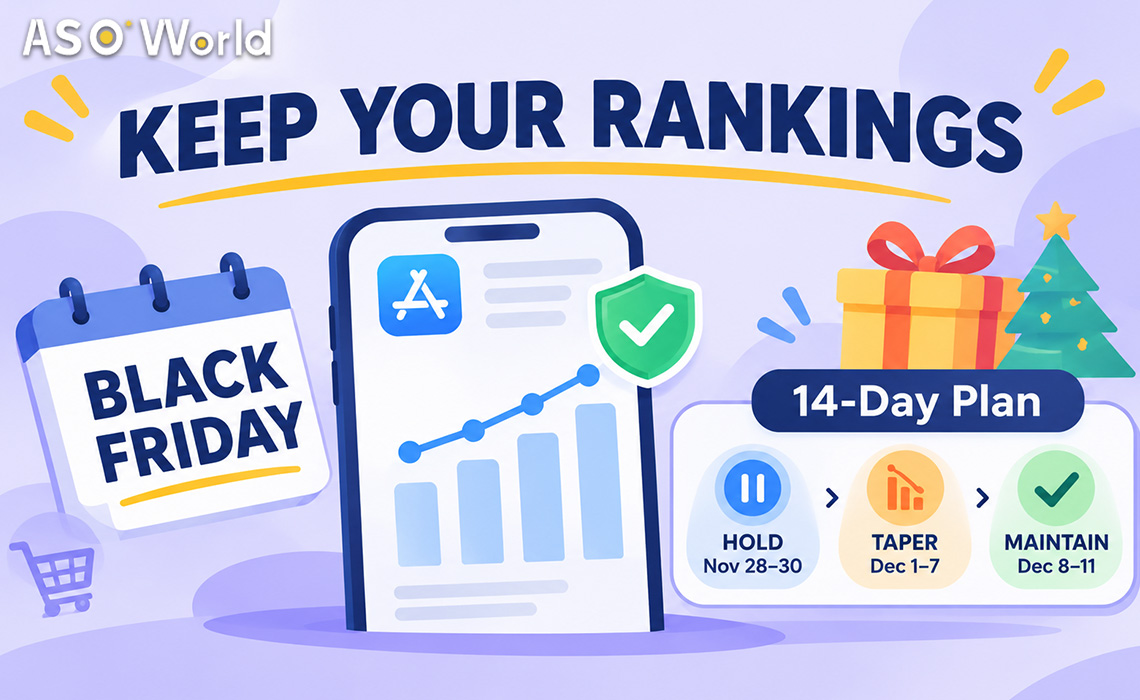
- Triage every keyword into keep, taper or drop, then follow a 14-day plan: hold through Cyber Monday (Nov 28–30), taper (Dec 1–7), settle into maintenance and plan for Christmas (Dec 8–11).
- A maintenance pace usually costs a fraction of the peak-week budget, and keeps the positions that will matter again at Christmas and New Year.
- If your Black Friday spend moved your account into a higher membership tier, your December unit prices are already lower. Check your tier and remaining balance before you decide to stop.
Why do rankings drop right after Black Friday?
| Cause | What happens | What you can control |
|---|---|---|
| Install velocity drops | Rankings, especially chart positions, depend on recent installs. When your campaign or promo ends, velocity falls and positions follow | How gradually you slow down |
| Seasonal terms cool off | "Black friday deals", "cyber monday" and similar terms lose most of their volume within days | Which keywords you keep funding |
| Competitors move to Christmas | Budgets move to gift, holiday and year-end terms | Whether you're already positioned for those |
| Store re-ranking | Some keyword positions settle lower once the holiday spike is over | Your maintenance pace and relevance |
Only the first three are fully in your hands, and that's enough to keep most of what you gained.
Stop, taper or maintain? What each choice costs
| Option | What you do | What usually happens | When it makes sense |
|---|---|---|---|
| Stop | End every order on Nov 28 | iOS positions fade within days; Google Play drifts down over a week or two; chart positions disappear quickly | Seasonal-only app, or the campaign didn't pay back |
| Taper | Reduce volume step by step over 7–10 days | Some positions soften, but core terms usually hold near their range | Most apps; the default choice |
| Maintain | Keep winners at a steady, lower pace into December | Positions hold, ready for Christmas and New Year searches | Apps whose keywords stay relevant all year |
Most teams should taper first, then maintain the winners. "Stop" saves a few days of spend but often costs more later, when you have to rebuild the same positions for Christmas.
Step 1: Triage every keyword (keep, taper or drop)
Export your Black Friday keyword list and sort each term with this table:
| Signal from the last 14 days | Decision | Next pace |
|---|---|---|
| In the Top 10, bringing search installs, relevant all year | Keep | Maintenance pace |
| In the Top 10, bringing installs, but seasonal (black friday, cyber monday, deals today) | Taper → drop | Halve, then stop by Dec 4 |
| Top 11–30, rising, relevant all year | Keep | Steady moderate pace for 1–2 more weeks |
| Top 10 but no installs from search | Drop | Fix product page first; stop paying for rank |
| Still outside Top 50 after 10+ days | Drop | Re-check relevance; replace with long-tail |
| Christmas or gift intent (gift, christmas, holiday) | Add / keep | Start or continue now; it peaks mid-December |
Most apps end up with 5–10 keywords to keep, a few to taper, and a short list to drop.
Step 2: Follow the 14-day taper plan
Days 1–3 (Nov 28–30): Hold through Cyber Monday
- Keep keep and taper keywords at roughly peak pace through Cyber Monday (Nov 30). Search traffic is still high.
- If you ran a chart push, reduce it by about half on Nov 28 and end it by Nov 30. Chart positions fade fast either way. Tapering just softens the drop.
- Update promotional text and screenshots the moment your Black Friday offer ends. An expired offer on the page hurts conversion.
Days 4–10 (Dec 1–7): Taper
- Keep keywords: lower to about 50–60% of peak volume, then to 30–40% by Dec 7.
- Taper keywords (seasonal): halve on Dec 1, stop by Dec 4.
- Don't cut every keyword on the same day. Spread reductions over several days so rankings settle gradually.
- Expect a small dip as volume falls. Judge on a 7-day average, not a single day.
Days 11–14 (Dec 8–11): Maintain and plan Christmas
- Hold keep keywords at a steady maintenance pace, in proportion to your organic daily installs.
- Start or step up Christmas and gift-intent keywords now. They peak in mid-December.
- On iOS, submit any metadata changes for the holidays early in December. App Store review and indexing take time, and Apple usually announces a holiday submission schedule toward the end of the year.
You can adjust the volume for each keyword and country on keyword installs, from $0.20 per install on Google Play and $0.30 on iOS (checked November 10, 2026).
Step 3: What does tapering cost compared with stopping?
Illustrative example: Google Play, 10 keywords kept in one country
| Period | Pace | Installs | Cost at $0.20 |
|---|---|---|---|
| Black Friday week (reference) | 10 keywords × 15/day × 7 days | 1,050 | $210 |
| Nov 28–30 (hold) | 10 × 15/day × 3 days | 450 | $90 |
| Dec 1–7 (taper, average ~8/day) | 10 × 8/day × 7 days | 560 | $112 |
| Dec 8–11 (maintain) | 10 × 5/day × 4 days | 200 | $40 |
| Total for the 14 days | 1,210 | $242 |
At maintenance pace, holding 10 keywords costs about $10 a day in this example. Rebuilding the same positions from scratch for Christmas would usually take another full ramp of 1–2 weeks at higher volume.
Unit prices also fall as your cumulative spend passes each membership tier. For example, keyword installs on Google Play drop from $0.20 at Base to $0.19 at Bronze (from $1,000 cumulative spend) and $0.17 at Silver (from $5,000). If Black Friday moved your account up a tier, these December numbers are already lower.
If you'd like the taper and the Christmas follow-up run as one campaign, the keyword ranking and organic downloads solution covers the plan, the pacing and the reporting.
Step 4: Bridge into Christmas and New Year
The weeks after Black Friday are a good time to reposition:
| Window | What users search for | What to do |
|---|---|---|
| Dec 1–15 | Gifts, holiday planning, travel, budgeting | Add gift and holiday-intent keywords; refresh screenshots |
| Dec 16–25 | Last-minute gifts, new devices, games for the holidays | New-device installs peak around Christmas. Make sure your onboarding and first screenshots welcome new users |
| Dec 26–Jan 7 | New Year resolutions: fitness, learning, finance, productivity | Prepare resolution keywords in December so they're indexed before January 1 |
If your category has a holiday spike (games, photo, productivity, fitness), a short category push in the days around Christmas can pay back better than one during Black Friday week. The boost app rankings and user acquisition solution shows how to time chart and keyword work together.
Step 5: Report what Black Friday actually delivered
Before planning December, write a one-page review with five numbers:
- Keywords in the Top 10 before vs. after the campaign.
- Search impressions (App Store Connect / Play Console), campaign weeks vs. the two weeks before.
- Organic installs from search, same comparison.
- Conversion rate of the product page during the promotion.
- Cost per extra organic install: total spend ÷ extra organic installs.
These numbers tell you which keywords and markets deserve December budget, and they're what your team will ask for.
Should you tell your customers or team about the dip in advance?
Yes. A planned taper almost always comes with a small, short-lived dip in rankings. If the people watching the numbers aren't expecting it, they may panic and ask to restart the campaign at full volume, which wastes budget. Share the taper schedule beforehand, say which keywords are being dropped on purpose, and agree to judge results on a 7-day average. That one message prevents most post-holiday "the campaign stopped working" conversations.
Post-Black Friday checklist
- ☐ Every keyword sorted into keep, taper, drop or add
- ☐ Chart push reduced on Nov 28, ended by Nov 30
- ☐ Expired promo text and screenshots replaced
- ☐ Taper schedule set so cuts are spread over several days
- ☐ Christmas and New Year keywords chosen and added to metadata
- ☐ Remaining account balance and current membership tier checked
- ☐ One-page Black Friday review shared with the team
Want the whole taper and holiday plan handled?
The app promotion service can run the post-Black Friday taper, the Christmas keyword build-up and any holiday chart pushes as one campaign by market. New accounts currently get 50% off the first order, as shown on the site (check the page for current terms).
FAQ
Why did my app's ranking drop after Black Friday?
Usually because install velocity fell when campaigns and promotions ended, seasonal search terms lost volume, and competitors moved their budgets to Christmas. Rankings driven by recent activity drop when that activity stops.
Should I stop all keyword campaigns after Black Friday?
Usually not. Stop seasonal terms, but taper evergreen keywords gradually and keep the winners at a maintenance pace. Stopping everything at once tends to cost more later, when you have to rebuild for Christmas.
How long should the taper take?
About 7–10 days. Hold through Cyber Monday, then reduce volume in steps through the first week of December.
How much does it cost to maintain keyword rankings?
At a maintenance pace, often a fraction of peak spend. In the example above, about $10 a day holds 10 Google Play keywords in one country. Actual needs depend on competition and your organic installs.
When should I start Christmas ASO?
Early December. Add gift and holiday keywords in the first week, and submit iOS metadata changes early to allow time for review and indexing before the year-end slowdown.
What should I report after Black Friday?
Top 10 keyword count before and after, search impressions, organic installs from search, product page conversion rate, and cost per extra organic install.