TL;DR
- The goal of a keyword campaign is organic uplift: extra search installs that keep coming after your ranking improves.
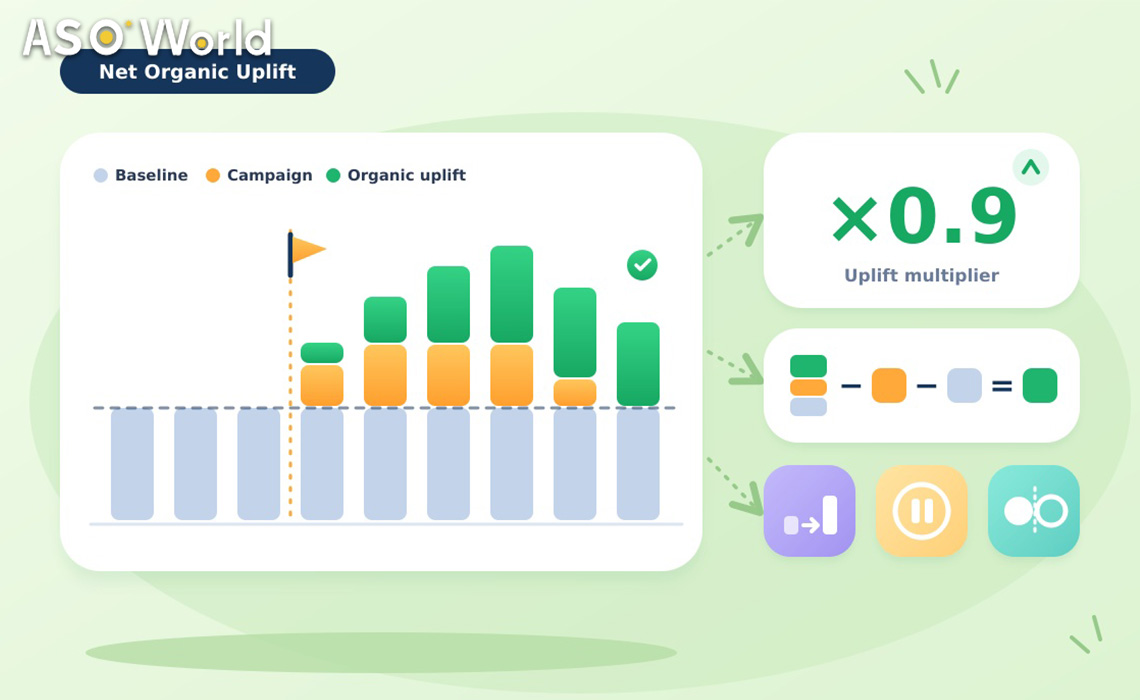
- Measure it as: net organic uplift = (search installs in the period − campaign installs delivered) − expected baseline.
- Use a 28-day baseline with the same weekdays, compare search-sourced installs in App Store Connect / Google Play Console, and cross-check with organic installs in your MMP.
- Three methods work without a data science team: before/after with baseline, pause test, and country holdout.
Most teams judge an ASO campaign by looking at keyword rankings. Rankings matter, but your CFO doesn't pay for rankings - they pay for installs that keep arriving without extra spend. This guide shows you how to measure that organic lift using the tools you already have: App Store Connect, Google Play Console and your mobile measurement partner (MMP).
What is organic uplift in ASO?
Organic uplift is the additional organic installs your app receives because it ranks higher for a keyword - beyond what you would have received anyway.
It is different from:
- Campaign installs: installs delivered as part of the campaign itself.
- Seasonal lift: installs that would have increased anyway (Black Friday, Christmas, New Year).
- Paid halo: organic installs triggered by paid ads running at the same time.
Good measurement separates all three.
Where does each number come from?
| Source |
What it shows |
Best for |
Limitation |
| App Store Connect (App Analytics) |
Installs by source type, including App Store Search |
iOS search-sourced installs per country |
Opt-in data only; delayed by a day or two |
| Google Play Console (acquisition reports) |
Installs by traffic source, including Search and Explore |
Android search vs browse split |
Some installs appear as unattributed |
| MMP (Adjust, AppsFlyer, etc.) |
Organic vs non-organic installs, downstream events |
Retention, revenue and events by cohort |
Can't see which keyword drove an organic install |
| Rank tracker |
Keyword position by country, daily |
Linking rank changes to install changes |
Positions differ by device and location |
If Google Play's numbers don't add up, read Explore vs Search vs Unattributed first. If your phone shows a different rank than your tool, see why rankings differ on your phone.
The formula: how to calculate net organic uplift
Expected baseline  = average daily search installs in the 28 days before
                     (same weekdays, same country)
Observed           = daily search installs during and after the campaign
Campaign delivered = installs delivered by the campaign that day
Net organic uplift = (Observed − Campaign delivered) − Expected baseline
Uplift multiplier  = Net organic uplift ÷ Campaign delivered
Example (illustrative): Your app averaged 120 search installs a day in Germany before the campaign. During the second campaign week, search installs average 310 a day, and the campaign delivers 100 a day. Campaign-delivered installs are reported daily in your keyword installs dashboard, which makes the subtraction step straightforward.
- Net organic uplift = (310 − 100) − 120 = 90 extra organic installs a day
- Uplift multiplier = 90 ÷ 100 = 0.9
The multiplier is the most useful single number for comparing keywords and countries. Track it after the campaign ends too—if organic installs stay above baseline after you taper, the ranking is holding. If they slide when you stop, how to taper and hold rankings gives you a 30-day recovery plan.
Three ways to measure without a data science team
| Method |
How it works |
When to use |
Watch out for |
| Before/after with baseline |
Compare campaign period to a 28-day baseline |
Default for every campaign |
Seasonality - adjust if a holiday falls in either window |
| Pause test |
Taper to maintenance pace for a week and watch search installs |
Proving that a keyword still pays |
Pausing abruptly can drop rankings - taper instead |
| Country holdout |
Run in country A, not in similar country B; compare trends |
Seasonal periods when baselines are unreliable |
Countries must be truly similar in language and category |
AppTweak's published incrementality approach uses the same ideas at scale - forecasting a baseline from historical data (extrapolation) and comparing short on/off periods (interpolation) - with statistical significance testing. If you have that tooling, use it; if not, the table above gets you most of the way.
How to set up your measurement: a 7-step workflow
- Pick the scope. One country, 3–5 keywords, one store.
- Record the baseline. Export 28 days of daily search-sourced installs and keyword ranks before the campaign.
- Log campaign delivery. Keep a daily record of installs delivered per keyword.
- Tag the period in your MMP. Add an annotation for the campaign start, end and taper dates so organic cohorts can be compared.
- Track daily for the full observation window. iOS ranks can refresh with a delay; Google Play usually needs about a week to stabilize.
- Calculate net uplift weekly. Use the formula above per country.
- Check quality downstream. Compare day-7 retention and revenue of organic cohorts during the uplift period with the baseline cohorts.
Step 7 is where your MMP earns its keep: an organic uplift that retains as well as your normal organic users is real growth.
What results should make you scale, hold or stop?
| Signal after 2 weeks |
Interpretation |
Next step |
| Rank up, net uplift > 0, retention normal |
Keyword is paying back |
Scale or extend; then taper and hold |
| Rank up, net uplift ≈ 0 |
Keyword has little real search demand, or your conversion is weak |
Check conversion with the badly ranked vs. not ranked diagnostic |
| Rank flat |
Keyword too competitive or app outside reach |
Switch to more relevant, less competitive keywords |
| Uplift disappears after stopping |
Ranking not holding |
Plan a gradual taper instead of a hard stop |
ASOWorld's keyword ranking and organic downloads solution is built around this sequence: choose keywords you can win, raise rankings, then hold them while organic installs build.
Common mistakes that inflate (or hide) uplift
- Counting campaign installs as organic. Search-sourced installs in store consoles include campaign installs that started from search - subtract them.
- Ignoring seasonality. A December campaign compared with a November baseline will look better than it is for most categories.
- Running paid search at the same time without noting it. Apple Ads or Google App campaigns can lift organic installs too.
- Measuring too early. Day-two numbers on iOS are often incomplete.
- Looking only at installs. If uplift cohorts churn fast, the ranking is bringing the wrong users - revisit keyword relevance.
How to report it to your team
Add three lines to your weekly report: net organic uplift per day, uplift multiplier, and day-7 retention of uplift cohorts vs baseline. Our weekly ASO report template has a ready-made section for keyword tiers and next steps.
FAQ
What is organic uplift in app marketing?
It's the extra organic installs your app gets because of a marketing action - such as a higher keyword ranking - beyond the installs it would have received anyway.
Can my MMP show which keyword drove an organic install?
No. MMPs classify installs as organic or non-organic but can't attribute organic installs to specific App Store keywords. Combine store console search data with a rank tracker.
How long should the baseline period be?
28 days with matching weekdays works well for most apps. Avoid baselines that include a major holiday or a feature placement.
Should campaign installs be excluded from the uplift calculation?
Yes. Subtract the installs delivered by the campaign from search-sourced installs, otherwise you'll overstate the organic effect.
What's a good uplift multiplier?
It varies by keyword and category. Any keyword where net uplift stays positive after you taper is generally worth keeping; compare multipliers across keywords to decide where to spend next.
How do I measure uplift during Black Friday or Christmas?
Use a country holdout or compare against last year's same period, because a normal 28-day baseline will understate seasonal demand.
 COVID-19 UPDATE