TL;DR
- With a Black Friday budget of $5,000–$50,000, the challenge is no longer simply deciding whether to use keyword installs. It is about allocating spend across markets and campaign types, while securing the most cost-effective unit rates.
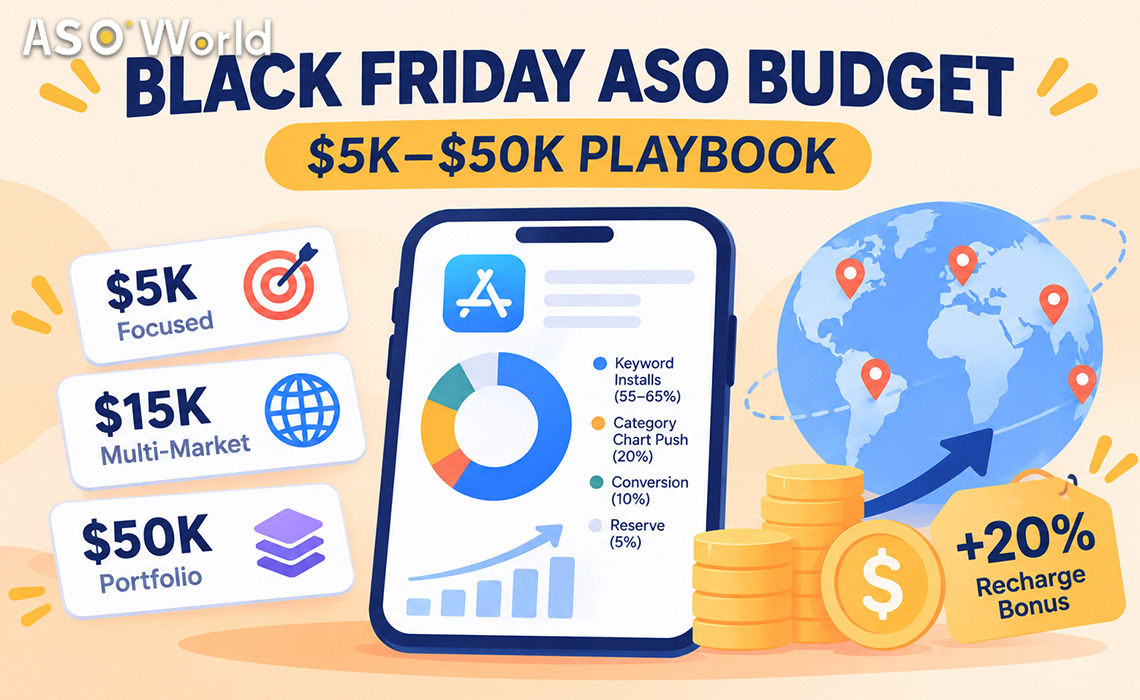
- There are three budget models to consider: $5k (focused), $15k (multi-market) and $50k (portfolio). Each directs the largest share of spend towards keyword visibility, supported by a carefully timed chart campaign and a smaller investment in conversion.
- Membership tiers automatically reduce unit prices as cumulative spending increases. For instance, Google Play keyword installs cost $0.20 at Base, $0.17 at Silver, $0.15 at Gold and $0.13 at Platinum.
- Recharge bonuses provide additional account balance on a single top-up: +5% from $500, +10% above $1,000, +15% above $5,000 and +20% above $10,000. Combined with tier-based pricing, these bonuses can reduce the effective cost of a Google Play keyword install to approximately $0.125 at Gold.
- Bonus balance is non-refundable and does not expire, so only recharge what your campaign is expected to use. Aim to complete your top-up and start placing orders by around November 20.
Who is this plan designed for?
- Publishers and studios managing multiple apps or at least three markets ahead of Black Friday 2026, which falls on Friday, November 27.
- Agencies and resellers coordinating campaigns for several clients during the same period.
- Teams that already understand which keywords and markets deliver results and are now looking to scale their campaigns efficiently.
If you are still trying to establish whether keyword campaigns are worthwhile for your app, it makes sense to begin with a smaller test. Once you have reliable performance data, you can return to a larger-scale plan.
Three Black Friday budget blueprints
Blueprint A — $5,000: Focused campaign (1–2 apps, 2–3 markets)
| Budget allocation |
Share |
Amount |
Purpose |
| Keyword installs |
65% |
$3,250 |
15–25 keywords across 2–3 priority markets, Nov 14–Dec 1 |
| Category chart campaign |
20% |
$1,000 |
One market, Nov 23–28 |
| Conversion improvements (ratings and product page updates) |
10% |
$500 |
Consistent ratings activity and seasonal screenshots |
| Reserve |
5% |
$250 |
Protect an existing ranking or extend a campaign that is performing well |
Blueprint B — $15,000: Multi-market campaign (2–5 apps, 4–8 markets)
| Budget allocation |
Share |
Amount |
Purpose |
| Keyword installs |
60% |
$9,000 |
Full campaign activity in priority markets, with long-tail keywords supporting secondary markets |
| Category chart campaigns |
20% |
$3,000 |
2–3 app-and-market combinations, Nov 23–28 |
| Conversion improvements |
10% |
$1,500 |
Ratings and localised creative assets |
| Reserve |
10% |
$1,500 |
Reallocate funds following the November 24 performance review |
Blueprint C — $50,000: Portfolio-wide campaign (5+ apps, 8+ markets)
| Budget allocation |
Share |
Amount |
Purpose |
| Keyword installs |
55% |
$27,500 |
Keyword plans covering the full app portfolio, with delivery paced according to market type |
| Category chart campaigns |
20% |
$10,000 |
Priority app-and-market combinations, staggered between Nov 22–29 |
| Conversion improvements |
10% |
$5,000 |
Ratings and creative updates in the strongest markets |
| Post-peak taper |
5% |
$2,500 |
Gradually reduce activity from Nov 30–Dec 7 to help protect rankings |
| Reserve |
10% |
$5,000 |
Daily budget adjustments managed by the campaign lead |
The principle behind all three plans: allocate the largest share of keyword spend to priority markets, maintain a measured pace in lower-competition markets rather than pushing too aggressively, and only invest in chart campaigns where the category is genuinely likely to benefit from Black Friday demand.
For keyword-level campaigns, use keyword installs. Chart campaigns can be supported through package installs.
How do membership tiers affect your unit prices?
ASOWorld has eight membership levels. Once your cumulative spending reaches a qualifying threshold, the corresponding tier's unit prices apply automatically. The following levels are particularly relevant to Black Friday budgets of this size:
Google Play
| Membership tier (cumulative spend) |
Package install |
Keyword install |
Rating add-on |
Review add-on |
| Base (≥ $0) |
$0.15 |
$0.20 |
$0.10 |
$0.08 |
| Bronze (≥ $1,000) |
$0.14 |
$0.19 |
$0.09 |
$0.07 |
| Silver (≥ $5,000) |
$0.13 |
$0.17 |
$0.09 |
$0.07 |
| Gold (≥ $10,000) |
$0.12 |
$0.15 |
$0.08 |
$0.06 |
| Platinum (≥ $50,000) |
$0.11 |
$0.13 |
$0.08 |
$0.06 |
App Store (iOS)
| Membership tier (cumulative spend) |
Package install |
Keyword install |
Rating add-on |
Review add-on |
| Base (≥ $0) |
$0.30 |
$0.30 |
$0.38 |
$0.44 |
| Bronze (≥ $1,000) |
$0.28 |
$0.28 |
$0.37 |
$0.42 |
| Silver (≥ $5,000) |
$0.27 |
$0.27 |
$0.36 |
$0.39 |
| Gold (≥ $10,000) |
$0.26 |
$0.26 |
$0.33 |
$0.37 |
| Platinum (≥ $50,000) |
$0.25 |
$0.25 |
$0.30 |
$0.35 |
The higher membership levels — Diamond from $100,000, Elite from $200,000 and Ultimate from $500,000 — offer further reductions, bringing keyword install prices down to $0.09 on Google Play and $0.20 on iOS.
What does this mean for your campaign? If your account has already reached Silver or Gold through previous campaigns, the same budget can buy approximately 18% (Silver) to 33% (Gold) more Google Play keyword installs than at Base rates. A campaign worth $15,000 or $50,000 may also move your account into a higher tier part-way through, reducing the cost of subsequent orders.
How do recharge bonuses reduce your effective cost?
Membership pricing is not the only way to improve value. A single account recharge can also earn additional balance:
| Single recharge amount |
Bonus |
Example |
| $500–$1,000 |
+5% |
$800 → $840 balance |
| Over $1,000, up to $5,000 |
+10% |
$3,000 → $3,300 balance |
| Over $5,000, up to $10,000 |
+15% |
$8,000 → $9,200 balance |
| Over $10,000 |
+20% |
$15,000 → $18,000 balance |
Both the original funds and the bonus balance are used at the rates associated with your current membership tier. Bonus funds do not expire and cannot be refunded.
Effective cost per Google Play keyword install (tier price ÷ (1 + bonus rate)):
| Membership tier |
No bonus |
+10% |
+15% |
+20% |
| Base |
$0.200 |
$0.182 |
$0.174 |
$0.167 |
| Silver |
$0.170 |
$0.155 |
$0.148 |
$0.142 |
| Gold |
$0.150 |
$0.136 |
$0.130 |
$0.125 |
| Platinum |
$0.130 |
$0.118 |
$0.113 |
$0.108 |
Consider the keyword allocation in Blueprint B, which is $9,000. At Base pricing with no recharge bonus, that amount covers approximately 45,000 installs. At Gold pricing with a 20% recharge bonus, the same $9,000 spend represents approximately 72,000 installs. That is around 60% more volume for the same amount of money.
When should you recharge, and how much should you add?
- Use one or two substantial top-ups rather than lots of smaller ones. The bonus is calculated against each individual recharge, so a single $15,000 payment earns a higher bonus than splitting the same amount into three $5,000 payments.
- Only recharge what you expect to use over the next one or two months. Although bonus balance does not expire, it cannot be refunded. If your Christmas or early-January campaigns are already confirmed, include those costs in your planning.
- Aim to complete the recharge by around November 20. Allow enough time for payment verification, particularly when dealing with large amounts or international transactions, so your orders can begin as scheduled.
- Place your orders soon after the account is funded. One common reason Black Friday campaigns start late is that the balance has been added, but the orders are still sitting in draft status.
- Set up a balance alert. Make sure your campaign does not unexpectedly stop on November 26 because the account has run out of funds.
Example: Putting Blueprint B into practice
A studio managing three apps has already reached Silver membership. It plans to spend $15,000 on a Black Friday campaign covering the UK, Germany, Canada and Turkey.
- Single $15,000 recharge on November 18 → $18,000 in account balance, including the +20% bonus.
- Keyword allocation: $9,000 of the campaign budget is assigned to keyword installs, using the Silver rate initially and the Gold rate once cumulative spending passes $10,000.
- Chart campaigns: The studio targets the UK and Turkey for the two apps whose categories are expected to see a seasonal increase, running from November 23–28.
- Reserve allocation: On November 24, funds are reassigned to UK keywords that have reached the Top 10 most quickly.
- Remaining balance: Thanks to the recharge bonus, any unused funds can be carried forward into the December Christmas keyword campaign.
This is an illustrative example rather than a guaranteed campaign outcome.
How can you manage risk in a large campaign?
A larger budget can magnify the impact of poor decisions. Four safeguards can help keep a sizeable campaign under control:
| Risk control |
How to apply it |
| Distribute spend across markets |
Avoid allowing a single market-and-keyword combination to absorb a disproportionate share of the budget. Give priority markets the lead role and use other markets as supporting opportunities. |
| Adjust the pace to each market |
Maintain a measured delivery rate in less competitive storefronts, where rankings can rise too quickly, and allow more time to build momentum in highly competitive markets. |
| Keep install volume proportionate |
Keyword-driven installs should remain at a reasonable level relative to each app's natural daily download volume. |
| Keep a clear record |
Save daily screenshots of rankings and delivery figures, alongside a written plan for each market. This makes campaign performance easier to check, assess and explain. |
For a market-by-market view of how chart visibility and keyword campaigns can work together, take a look at the app ranking and user acquisition solution.
Pre-launch checklist (complete by November 20)
- ☐ Select a blueprint and assign budgets to each app, market and campaign type.
- ☐ Confirm the current membership tier and estimate which tier the account is likely to reach after the campaign.
- ☐ Complete the recharge using as few top-ups as practical and confirm that the payment has cleared.
- ☐ Create and start all keyword and chart orders; do not leave any campaigns in draft status.
- ☐ Set a balance alert and agree how much funding should remain in reserve.
- ☐ Document the tapering plan for Nov 28–Dec 7.
- ☐ Assign a primary contact and a backup for every market throughout the Thanksgiving weekend.
Would you like help putting the plan together?
For campaigns of this size, the app promotion service team can help turn your budget blueprint into an actionable plan for each market. This can include keyword installs, chart campaigns, combined packages and API-based ordering across more than 100 countries, with pricing based on your membership tier.
FAQ
How should I allocate a $15,000 Black Friday ASO budget?
A typical allocation would put around 60% towards keyword installs, 20% into scheduled category chart campaigns, 10% into conversion improvements such as ratings and creative updates, and the remaining 10% into a reserve. Most of the keyword budget should go to your priority markets.
How do ASOWorld membership tiers work?
ASOWorld has eight membership levels, ranging from Base to Ultimate. Once cumulative spending reaches a specified threshold — $1,000 for Bronze, $5,000 for Silver, $10,000 for Gold, $50,000 for Platinum, and higher amounts for the upper tiers — the corresponding lower unit prices apply automatically.
How do recharge bonuses work?
A single recharge can earn additional account balance: 5% from $500, 10% above $1,000, 15% above $5,000 and 20% above $10,000. Both the original payment and the bonus balance are spent at your current membership rates. Bonus funds do not expire and are non-refundable.
Is it better to recharge once or make several smaller payments?
In most cases, one or two larger payments offer better value because the bonus is calculated on each individual top-up. However, only add funds that your campaign is likely to use within the following month or two.
When should a large Black Friday campaign begin?
Keyword campaigns should ideally get under way around November 14–18, giving Google Play rankings time to settle and allowing iOS campaigns to build momentum. Category chart campaigns should be timed for November 23–28. Complete your recharge and payment approvals by approximately November 20.
What is the biggest risk when managing a large ASO budget?
Over-concentration is a major risk. Putting too much volume into a small number of keywords or markets, or failing to adjust delivery rates, can undermine the campaign. Spread the budget across markets, tailor the pace to local competition, keep install volumes proportionate to natural downloads and review performance records every day.
 COVID-19 UPDATE