noticeCOVID-19 UPDATE ASO World entire team is working remotely. we expect no disruptions in our ASO services.
Browser close
1
50% OFF FIRST ORDER
Referral Program
bonusprogram
1
50% OFF FIRST ORDER
Referral Program
bonusprogram
logo
  • 앱 프로모션 서비스
    키워드 설치
    패키지명(직접) 설치
    평점 및 리뷰
    고품질 리뷰 서비스
    키워드 랭킹 서비스 보증
    ASO 제공하다
    맞춤형 솔루션
    더 많은 서비스
  • ASO 도구
    무료 ASO 도구
    키워드 리서치 도구
    키워드 선택 방법
    promote
    모든 시즌을 성장 급증으로 바꾸세요
    FIFA 월드컵부터 여름 성수기, 블랙프라이데이부터 크리스마스까지 — 모든 성수기는 이미 경쟁사들이 공략하고 있는 사용자 확보의 기회입니다. 늦지 마세요.
  • 솔루션
    By vertical
    스포츠
    HOT
    일체 포함
    건강 및 피트니스
    전자상거래
    핀테크
    HOT
    게임
    교육
    데이트
    엔터테인먼트
    여행하다
    소셜 미디어
    레스토랑 및 푸드테크
    생산력
    Lifestyle
    음악
    Utility
    사진 & 비디오
    Casino
    Business
    소식
    NEW
    By Performance
    시즌 및 이벤트 마케팅
    NEW
    FIFA 월드컵 2026 앱 성장 전략
    HOT
    앱 평판 및 부정적 리뷰 관리
    앱 순위 및 사용자 확보 향상
    NEW
    유기적 반응 및 사용자 경험 개선
    NEW
    모바일 앱 출시 마케팅
    NEW
    키워드 순위 및 유기적 다운로드 증가
    NEW
    solution-suffix
    고객 스토리
    영감을 주는 고객 사례를 살펴보고 귀하와 같은 기업이 ASO World를 성공적으로 활용하여 강력한 모바일 앱을 만든 방법을 알아보세요.
    how-to-pick-keywords
    앱스토어와 구글플레이를 위한 올바른 키워드 선택 방법
    스토어 검색을 실제 설치로 전환하는 키워드를 찾고, 분류하고, 검증하는 리서치-투-랭킹 프레임워크와 안전하게 순위를 올리는 실행 플랜을 소개합니다.
  • ASO 아카데미
    블로그
    사례 연구
    가이드 및 통찰력
    일반적인 문제
    용어 사전
    promote
    모든 시즌을 성장 급증으로 바꾸세요
    FIFA 월드컵부터 여름 성수기, 블랙프라이데이부터 크리스마스까지 — 모든 성수기는 이미 경쟁사들이 공략하고 있는 사용자 확보의 기회입니다. 늦지 마세요.
    promote
    iPhone 듀오 ASO 가이드: 스크린샷, 미리보기 및 제품 페이지 최적화
    iPhone Duo를 위한 App Store 등록정보를 준비하세요: 스크린샷 크기, 외부 vs 내부 디스플레이 크리에이티브, PPO/CPP 테스트, 현지화, 지표 및 앱 심사 규정.
  • 가격
로그인 가입
logo
  • 앱 프로모션 서비스
    키워드 설치
    패키지명(직접) 설치
    평점 및 리뷰
    고품질 리뷰 서비스
    키워드 랭킹 서비스 보증
    ASO 제공하다
    맞춤형 솔루션
    더 많은 서비스
  • ASO 도구
  • 솔루션
    By vertical
    스포츠
    일체 포함
    건강 및 피트니스
    전자상거래
    핀테크
    게임
    교육
    데이트
    엔터테인먼트
    여행하다
    소셜 미디어
    레스토랑 및 푸드테크
    생산력
    Lifestyle
    음악
    Utility
    사진 & 비디오
    Casino
    Business
    소식
    By Performance
    시즌 및 이벤트 마케팅
    FIFA 월드컵 2026 앱 성장 전략
    앱 평판 및 부정적 리뷰 관리
    앱 순위 및 사용자 확보 향상
    유기적 반응 및 사용자 경험 개선
    모바일 앱 출시 마케팅
    키워드 순위 및 유기적 다운로드 증가
  • ASO 아카데미
    블로그
    사례 연구
    가이드 및 통찰력
    일반적인 문제
    용어 사전
  • 가격
Important Notice
중요 공지:파트타임 채용이나 ASO 수익 앱 활동을 위해 ASOWorld의 이름을 사용하는 사기에 주의하세요. ASOWorld는 파트타임 직원을 채용하지 않습니다. ASOWorld가 게시한 공식 정보만 신뢰하세요.
Close the Important Notice

Did the Campaign Lift Organic Installs? How to Measure Organic Uplift in Your MMP and App Store Connect

Did your keyword campaign lift organic installs? Use a 28-day baseline, App Store Connect search data and your MMP to calculate net organic uplift.

공개 날짜: 4 days ago
업데이트 날짜: Today

홈페이지 블로그 ASO 가이드 Did the Campaign Lift Organic Installs? How to Measure Organic Uplift in Your MMP and App Store Connect

In twitter faceBook rss

Did the Campaign Lift Organic Installs

TL;DR

  • The goal of a keyword campaign is organic uplift: extra search installs that keep coming after your ranking improves.
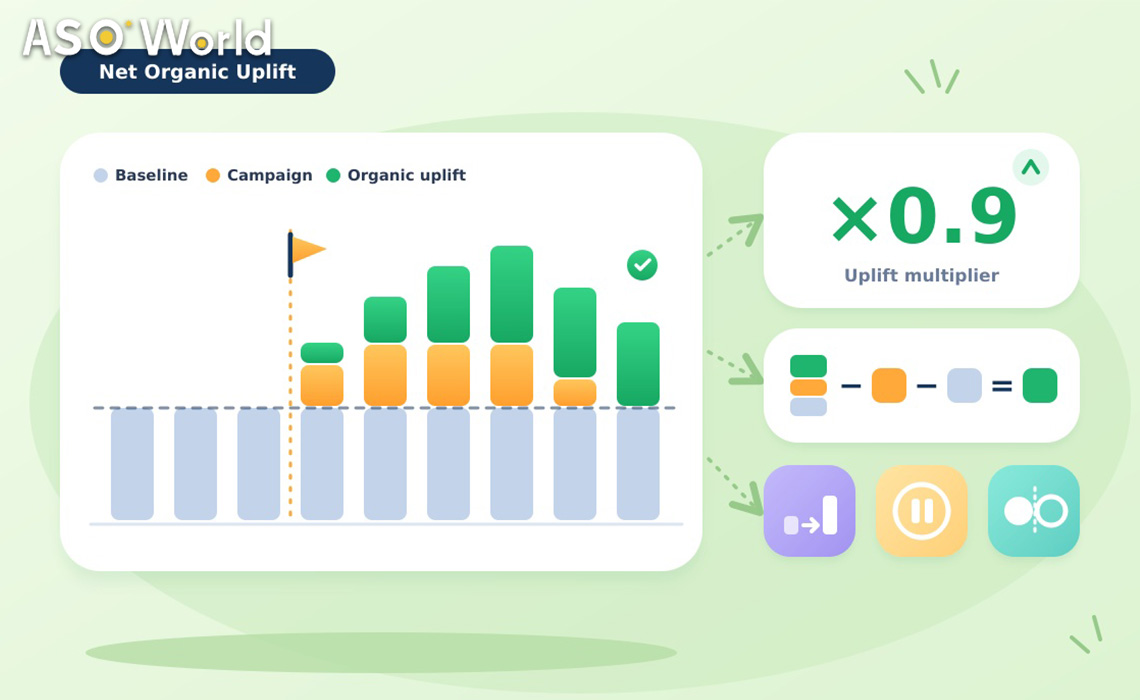
  • Measure it as: net organic uplift = (search installs in the period − campaign installs delivered) − expected baseline.
  • Use a 28-day baseline with the same weekdays, compare search-sourced installs in App Store Connect / Google Play Console, and cross-check with organic installs in your MMP.
  • Three methods work without a data science team: before/after with baseline, pause test, and country holdout.


Most teams judge an ASO campaign by looking at keyword rankings. Rankings matter, but your CFO doesn't pay for rankings - they pay for installs that keep arriving without extra spend. This guide shows you how to measure that organic lift using the tools you already have: App Store Connect, Google Play Console and your mobile measurement partner (MMP).


What is organic uplift in ASO?

Organic uplift is the additional organic installs your app receives because it ranks higher for a keyword - beyond what you would have received anyway.


It is different from:

  • Campaign installs: installs delivered as part of the campaign itself.
  • Seasonal lift: installs that would have increased anyway (Black Friday, Christmas, New Year).
  • Paid halo: organic installs triggered by paid ads running at the same time.


Good measurement separates all three.


Where does each number come from?


Source What it shows Best for Limitation
App Store Connect (App Analytics) Installs by source type, including App Store Search iOS search-sourced installs per country Opt-in data only; delayed by a day or two
Google Play Console (acquisition reports) Installs by traffic source, including Search and Explore Android search vs browse split Some installs appear as unattributed
MMP (Adjust, AppsFlyer, etc.) Organic vs non-organic installs, downstream events Retention, revenue and events by cohort Can't see which keyword drove an organic install
Rank tracker Keyword position by country, daily Linking rank changes to install changes Positions differ by device and location


If Google Play's numbers don't add up, read Explore vs Search vs Unattributed first. If your phone shows a different rank than your tool, see why rankings differ on your phone.


The formula: how to calculate net organic uplift

Expected baseline  = average daily search installs in the 28 days before
                     (same weekdays, same country)
Observed           = daily search installs during and after the campaign
Campaign delivered = installs delivered by the campaign that day
Net organic uplift = (Observed − Campaign delivered) − Expected baseline
Uplift multiplier  = Net organic uplift ÷ Campaign delivered


Example (illustrative): Your app averaged 120 search installs a day in Germany before the campaign. During the second campaign week, search installs average 310 a day, and the campaign delivers 100 a day. Campaign-delivered installs are reported daily in your keyword installs dashboard, which makes the subtraction step straightforward.

  • Net organic uplift = (310 − 100) − 120 = 90 extra organic installs a day
  • Uplift multiplier = 90 ÷ 100 = 0.9


The multiplier is the most useful single number for comparing keywords and countries. Track it after the campaign ends too—if organic installs stay above baseline after you taper, the ranking is holding. If they slide when you stop, how to taper and hold rankings gives you a 30-day recovery plan.


Three ways to measure without a data science team


Method How it works When to use Watch out for
Before/after with baseline Compare campaign period to a 28-day baseline Default for every campaign Seasonality - adjust if a holiday falls in either window
Pause test Taper to maintenance pace for a week and watch search installs Proving that a keyword still pays Pausing abruptly can drop rankings - taper instead
Country holdout Run in country A, not in similar country B; compare trends Seasonal periods when baselines are unreliable Countries must be truly similar in language and category


AppTweak's published incrementality approach uses the same ideas at scale - forecasting a baseline from historical data (extrapolation) and comparing short on/off periods (interpolation) - with statistical significance testing. If you have that tooling, use it; if not, the table above gets you most of the way.


How to set up your measurement: a 7-step workflow

  1. Pick the scope. One country, 3–5 keywords, one store.
  2. Record the baseline. Export 28 days of daily search-sourced installs and keyword ranks before the campaign.
  3. Log campaign delivery. Keep a daily record of installs delivered per keyword.
  4. Tag the period in your MMP. Add an annotation for the campaign start, end and taper dates so organic cohorts can be compared.
  5. Track daily for the full observation window. iOS ranks can refresh with a delay; Google Play usually needs about a week to stabilize.
  6. Calculate net uplift weekly. Use the formula above per country.
  7. Check quality downstream. Compare day-7 retention and revenue of organic cohorts during the uplift period with the baseline cohorts.


Step 7 is where your MMP earns its keep: an organic uplift that retains as well as your normal organic users is real growth.


What results should make you scale, hold or stop?


Signal after 2 weeks Interpretation Next step
Rank up, net uplift > 0, retention normal Keyword is paying back Scale or extend; then taper and hold
Rank up, net uplift ≈ 0 Keyword has little real search demand, or your conversion is weak Check conversion with the badly ranked vs. not ranked diagnostic
Rank flat Keyword too competitive or app outside reach Switch to more relevant, less competitive keywords
Uplift disappears after stopping Ranking not holding Plan a gradual taper instead of a hard stop


ASOWorld's keyword ranking and organic downloads solution is built around this sequence: choose keywords you can win, raise rankings, then hold them while organic installs build.


Common mistakes that inflate (or hide) uplift

  • Counting campaign installs as organic. Search-sourced installs in store consoles include campaign installs that started from search - subtract them.
  • Ignoring seasonality. A December campaign compared with a November baseline will look better than it is for most categories.
  • Running paid search at the same time without noting it. Apple Ads or Google App campaigns can lift organic installs too.
  • Measuring too early. Day-two numbers on iOS are often incomplete.
  • Looking only at installs. If uplift cohorts churn fast, the ranking is bringing the wrong users - revisit keyword relevance.


How to report it to your team

Add three lines to your weekly report: net organic uplift per day, uplift multiplier, and day-7 retention of uplift cohorts vs baseline. Our weekly ASO report template has a ready-made section for keyword tiers and next steps.


FAQ

What is organic uplift in app marketing?

It's the extra organic installs your app gets because of a marketing action - such as a higher keyword ranking - beyond the installs it would have received anyway.


Can my MMP show which keyword drove an organic install?

No. MMPs classify installs as organic or non-organic but can't attribute organic installs to specific App Store keywords. Combine store console search data with a rank tracker.


How long should the baseline period be?

28 days with matching weekdays works well for most apps. Avoid baselines that include a major holiday or a feature placement.


Should campaign installs be excluded from the uplift calculation?

Yes. Subtract the installs delivered by the campaign from search-sourced installs, otherwise you'll overstate the organic effect.


What's a good uplift multiplier?

It varies by keyword and category. Any keyword where net uplift stays positive after you taper is generally worth keeping; compare multipliers across keywords to decide where to spend next.


How do I measure uplift during Black Friday or Christmas?

Use a country holdout or compare against last year's same period, because a normal 28-day baseline will understate seasonal demand.


ASO Topic 앱 스토어 최적화,모바일 분석,

SHARE THIS POST

In twitter faceBook

Get FREE Optimization Consultation

Let's Grow Your App & Get Massive Traffic!


All content, layout and frame code of all ASOWorld blog sections belong to the original content and technical team, all reproduction and references need to indicate the source and link in the obvious position, otherwise legal responsibility will be pursued.

스토어 랭킹 취득 능력 검출 시작
ASO 도구로 한 단계씩 모든 앱 스토어 최적화 작업 측정
목차

    Categories

    • 앱 마케팅
    • 앱 프로모션 전략
    • 앱 프로모션 사례 연구
    • 모바일 게임 및 앱 인사이트
    • 앱 스토어 뉴스
    • ASO 가이드
    • 초보자를 위한 ASO 기초
    • 앱 스토어 순위
    • 사용자 획득
    • 모바일 앱 시장 동향
    • 게임 커뮤니티
    • iOS 17 ASO 허브
    • 아소월드 뉴스
    • ASO World Platform 가이드라인
    ASOWorld
    App Store Optimization service provider
    Follow ASOWorld:
    Boost your app via App Installs, Keyword Installs, App Reviews & Ratings & Guaranteed App Ranking.

    댓글

    아직 로그인하지 않았습니다. 먼저 로그인 / 회원가입 해주세요.

    관련 블로그
     Shopping and Deal Apps During Black Friday Week: A Day-by-Day Keyword Plan for Nov 24–Dec 1
    ASO 가이드

    Shopping and Deal Apps During Black Friday Week: A Day-by-Day Keyword Plan for Nov 24–Dec 1

    Today
    Your First ASO Order: A Small-Budget Starter Test You Can Read in 7 Days
    ASO 가이드

    Your First ASO Order: A Small-Budget Starter Test You Can Read in 7 Days

    Today
    프로모션 지금 바로 시작, 당신의 앱 탐색 여행을 시작하세요!
    고객님이 대기업이든 소규모 신생기업이든 Google Play, App Store, Galaxy Store 와 RuStore 에서 더 저렴한 가격으로 고객님의 앱을 홍보할 수 있도록 도와드립니다.
    프로모션 지금 바로 시작, 당신의 앱 탐색 여행을 시작하세요!
    • ASO
    • Email [email protected]
    • Contact Contact Us
    • twitter facebook linkedin instagram
    • 제공하다
    • 키워드 설치
    • 패키지명(직접) 설치
    • 평점 및 리뷰
    • 고품질 리뷰 서비스
    • 키워드 랭킹 서비스 보증
    • ASO 제공하다
    • 더 많은 서비스
    • ASO 도구
    • 무료 ASO 도구
    • 키워드 리서치 도구
    • 키워드 선택 방법
    • ASO 아카데미
    • 블로그
    • 사례 연구
    • 가이드 및 통찰력
    • 일반적인 문제
    • 용어 사전
    • 마케팅 뉴스
    • 회사
    • ASO World를 선택하는 이유
    • 우리에 관해
    • 문의하기
    • 리셀러 프로그램
    • 시작하기
    • LLM & AI 정보
    ASO World © 2020-2026 all rights reserved
    개인정보 처리 방침 서비스 약관

    당사는 웹사이트에서 쿠키를 사용하여 귀하의 기본 설정과 반복 방문을 기억하여 가장 관련성 높은 경험을 제공합니다. "수락"을 클릭하면 모든 쿠키 사용에 동의하는 것입니다.