COVID-19 UPDATE

Google Play 시스템 업데이트 2026년 9월: 안드로이드 개발자를 위한 새로운 기능 및 ASO 전략


중요 공지:파트타임 채용이나 ASO 수익 앱 활동을 위해 ASOWorld의 이름을 사용하는 사기에 주의하세요. ASOWorld는 파트타임 직원을 채용하지 않습니다. ASOWorld가 게시한 공식 정보만 신뢰하세요.

2026년 9월 7일 이전: Apple이 App Store Connect에 소셜 미디어 연령 등급 관련 질문 2가지를 새로 추가했습니다. 올바르게 답변하고 규정을 준수하는 방법을 알아보세요


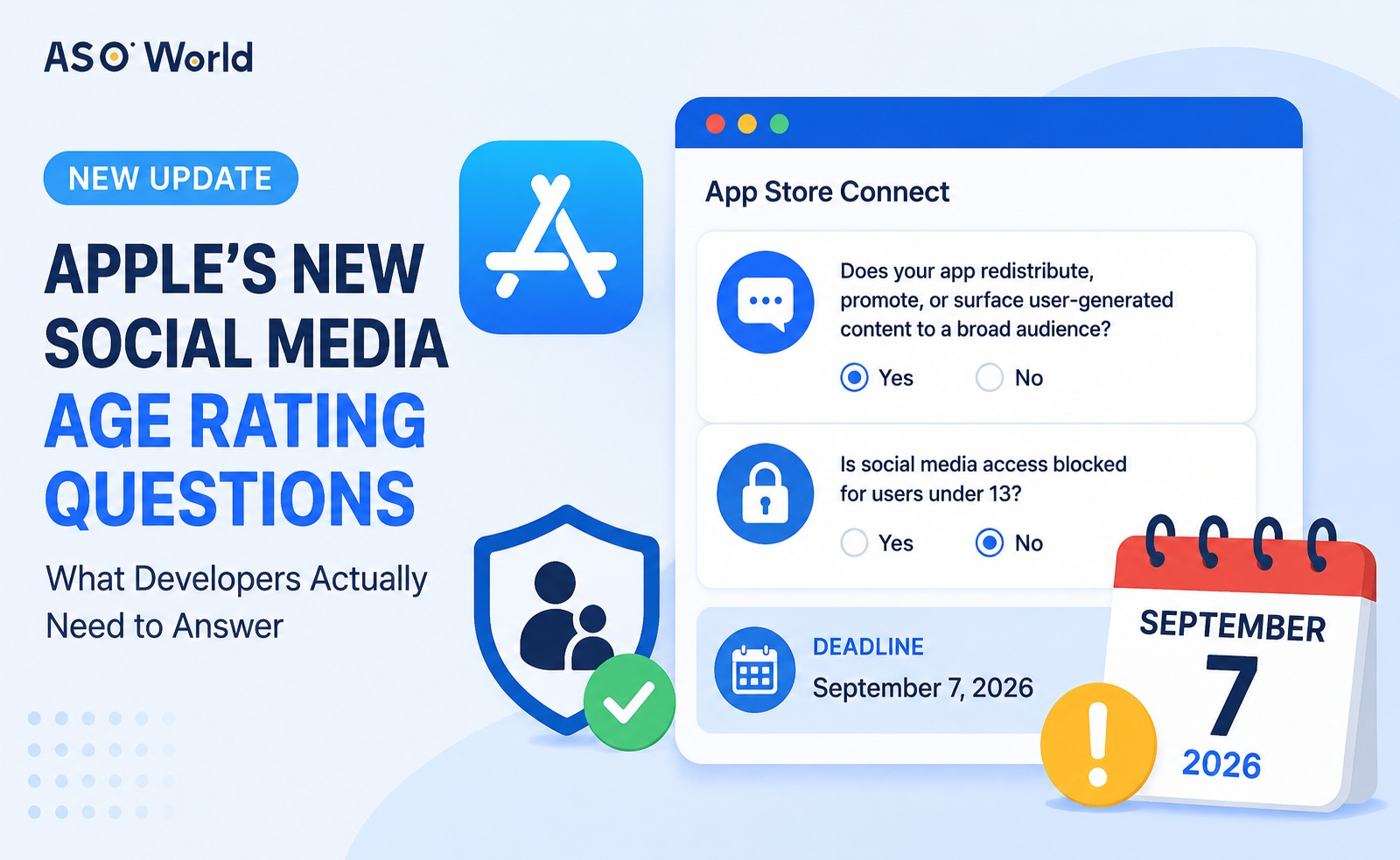
최근 App Store Connect에 로그인했다면 새로운 안내가 표시되는 것을 확인했을 수 있습니다. Apple은 소셜 미디어와 관련된 연령 등급 답변을 업데이트하도록 요청하고 있으며, 마감일은 2026년 9월 7일입니다. 앱 정보 → 연령 등급으로 이동하면 새롭게 추가된 두 가지 질문을 확인할 수 있습니다.
처음 보면 이 질문들은 단순히 “앱이 소셜 앱인가요?”라고 묻는 것처럼 보입니다. 하지만 Apple이 실제로 확인하려는 내용은 이것이 아닙니다. Apple은 앱의 구체적인 기능과 그 이면의 연령 보호 메커니즘을 평가하고 있습니다. Apple의 공식 문서를 바탕으로 이번 변경의 실제 의미와 올바르게 답변하는 방법을 정리하면 다음과 같습니다.
첫 번째 질문은 피드, 커뮤니티, 검색, 추천 또는 이와 유사한 탐색 기능을 통해 사용자 생성 콘텐츠(UGC)를 광범위한 사용자에게 재배포하거나 홍보하거나 노출하는지, 그리고 많은 사용자가 해당 콘텐츠와 상호작용하는지를 묻습니다.
이는 App Store 카테고리로 “소셜 네트워킹”을 선택했는지를 묻는 것이 아닙니다. 공유 버튼, 로그인 SDK 또는 타사 플랫폼과의 연결을 통합했는지를 묻는 것도 아닙니다.
두 번째 질문인 13세 미만 사용자의 소셜 미디어 접근 차단 여부에는, 앱이 실제로 13세 미만 사용자의 소셜 미디어 기능을 비활성화하고 해당 기능을 잠금 해제하기 전에 Declared Age Range API를 통해 사용자의 연령 범위를 조회하는 경우에만 “예”라고 답해야 합니다.
💡 전문가 팁: 앱에 UGC를 배포하기 위한 공개 피드나 탐색 기능이 없다면 일반적으로 두 질문 모두 “아니요”입니다. 앱에 소셜 미디어 기능이 있지만 13세 미만 사용자도 해당 기능에 접근할 수 있다면 첫 번째 질문에는 “예”, 두 번째 질문에는 “아니요”라고 답해야 합니다.
답변을 최종 확정하기 전에 앱의 현재 상태를 확인해 보는 것이 좋습니다. ASOWorld의 무료 ASO 도구를 사용해 현재 키워드 적용 범위와 순위를 무료로 확인해 보세요.
Apple은 2026년 6월 공식 문서에서 iOS 27, iPadOS 27, macOS 27 및 이후 버전에 스크린 타임 카테고리 제한을 도입했습니다. 이제 부모는 엔터테인먼트, 게임, 소셜 미디어 등 카테고리별로 사용 시간 예산을 설정할 수 있습니다.
중요한 점은 여기서 말하는 “소셜 미디어”가 App Store 탐색 카테고리를 의미하지 않는다는 것입니다. App Store에서 앱이 교육, 유틸리티 또는 라이프스타일 카테고리로 등록되어 있더라도 소셜 미디어 기능을 제공한다면 스크린 타임의 소셜 미디어 카테고리로 분류될 수 있습니다. Apple이 App Store 카테고리에서 이를 추론하지 않고 개발자가 해당 기능을 명시적으로 선언하도록 요구하는 이유가 바로 여기에 있습니다.
Apple의 문서에서는 개발자가 앱에 소셜 미디어 기능이 포함되어 있다고 선언하면 해당 앱이 스크린 타임의 소셜 미디어 카테고리에 배치되고 최소 연령 기준 13세 이상으로 취급된다는 점도 명확히 설명합니다. 소셜 미디어 기능이 13세 미만 사용자에게 비활성화되어 있다면 해당 사용자는 그 카테고리에서 제외됩니다.
여기서는 정확하게 이해할 필요가 있습니다. 이 “13세 이상 최소 기준”은 스크린 타임의 소셜 미디어 카테고리 내부에서 사용되는 기준을 의미하며, App Store 제품 페이지에 자동으로 13세 이상 등급이 표시된다는 뜻은 아닙니다. 전체 App Store 연령 등급은 여전히 전체 연령 등급 설문지와 지역별 규칙을 바탕으로 계산되며, OS 버전에 따라 달라질 수 있습니다.
즉, 이 두 질문은 앱에 “소셜”이라는 라벨을 붙이기 위한 것이 아닙니다. 부모가 시간 제한을 설정할 때 시스템이 앱의 사용 패턴을 어떻게 분류해야 하는지 알 수 있도록 하기 위한 것입니다.
앱 연령 등급 설정에 관한 Apple의 공식 문서에서는 연령 등급이 사용자가 앱의 콘텐츠와 잠재적으로 문제가 될 수 있는 요소를 이해하도록 돕고, 자녀를 위한 더 안전한 온라인 환경을 조성하는 자녀 보호 기능과 함께 작동한다고 설명합니다.
소셜 미디어는 정적인 콘텐츠와는 다른 유형의 위험을 수반합니다. 콘텐츠가 사용자에 의해 지속적으로 생성되고 빠르게 확산되며, 추천, 검색, 재공유 및 댓글을 통해 대규모 사용자에게 도달할 수 있기 때문입니다. 이러한 바이럴 및 탐색 중심의 노출은 앱 이름이나 지정된 카테고리만 보고 판단할 수 없습니다. Apple이 “소셜 미디어 기능”을 별도의 독립적인 질문으로 만든 이유가 바로 여기에 있습니다.
연령 등급 설문지는 콘텐츠 유형과 그 빈도에 관한 데이터를 수집하며, 시스템은 각 국가의 기준에 따라 전 세계 등급과 적용 가능한 지역별 등급을 계산합니다. 이번에 새로운 질문이 추가되면서 제품 페이지에는 이제 소셜 미디어 콘텐츠에 관한 더 자세한 설명도 표시될 수 있습니다.
두 번째 질문은 서로 매우 다른 두 가지 제품을 추가로 구분합니다.
후자의 경우에도 전체 연령 등급이 자동으로 13세 이상으로 상향되지는 않습니다. 최종 연령 등급을 계산할 때 Apple은 여전히 설문지의 다른 항목을 함께 고려하기 때문입니다. 이는 모든 소셜 앱을 동일하게 분류하는 일괄 규칙이 아니라, 기능과 연령을 기반으로 한 세분화입니다.
연령 등급은 App Store Connect에서 필수 입력 항목이며, Apple은 이를 사용해 전 세계 및 지역별 등급을 생성합니다. Apple은 2026년 7월 9일 발표에서 설문지에 소셜 미디어 관련 질문이 포함되었으며, 9월부터는 새로운 앱을 제출하거나 기존 앱을 업데이트하거나 대체 앱 마켓플레이스를 통한 배포를 위해 공증을 신청할 때마다 이 질문에 답해야 한다고 확인했습니다.
따라서 이번 업데이트는 제품 기능 요건인 동시에 배포 메타데이터 규정 준수 요건이기도 합니다. 답변은 제품 로드맵, 마케팅 문구 또는 “사용자는 13세 이상이어야 한다”고 명시된 EULA의 문구가 아니라 현재 실제로 배포 중인 버전의 동작을 반영해야 합니다.
ASOWorld 첫 구매 할인
첫 주문 시 50% 할인받고 앱 성장을 시작하세요!
Apple의 핵심 정의는 소셜 피드 또는 이와 유사한 탐색 기능을 통해 사용자 생성 콘텐츠와 상호작용하거나 해당 콘텐츠를 재배포 또는 홍보할 수 있도록 하여 많은 사용자에게 확산하는 기능을 중심으로 합니다.
앱에 다음과 같은 특징이 있다면 “예”라고 답하세요:
앱이 다음 사례 중 하나에 해당한다면 “아니요”라고 답하세요:
마지막 사례는 자동 면제가 아니라 제품에 대한 판단이 필요한 경우입니다. 타사 공유 기능을 통합했더라도 앱에 자체 공개 피드나 UGC 추천 시스템이 있다면 해당 인앱 기능을 기준으로 “예”라고 답해야 합니다.
다음 조건을 모두 충족하는 경우에만 “예”라고 답하세요:
여기서 “차단”이라는 단어는 정책 문구가 아니라 실제 제품 동작을 의미합니다. 개인정보 처리방침, EULA 또는 가입 확인란에 “13세 미만 사용자는 이용할 수 없다”고 명시했더라도 해당 사용자가 공개 피드를 탐색하거나, UGC를 검색하거나, 댓글을 게시하거나, 딥 링크를 통해 소셜 기능에 접근할 수 있다면 “예”라고 답할 수 없습니다.
엔지니어링 관점에서는 다음 사항을 구체적으로 확인해야 합니다. 연령 확인이 기능 진입 시점 이전에 이루어지는지(이후가 아님), 클라이언트 UI뿐만 아니라 백엔드 API도 동일한 제한을 적용하는지, 기존 로그인 계정이나 딥 링크를 통해 제한을 우회할 수 있는지, 연령을 알 수 없거나 API를 사용할 수 없을 때 어떻게 처리되는지, 추천·댓글·재공유·검색 등 관련 하위 기능에도 동일한 규칙이 일관되게 적용되는지 확인해야 합니다.
연령 등급 답변을 올바르게 작성하면 규정을 준수할 수 있지만, 규정 준수만으로 순위가 올라가지는 않습니다. ASOWorld의 키워드 설치를 사용하면 키워드별 일일 수량을 설정할 수 있습니다. iOS 순위는 일반적으로 약 3일 후 업데이트되므로 규정 준수 업데이트와 순위 상승 작업을 함께 진행하면 효율적인 타이밍을 잡을 수 있습니다.
“소셜 미디어”를 App Store 카테고리와 혼동하는 것. 이 질문은 App Store Connect에서 선택한 기본 또는 보조 카테고리가 아니라 기능에 관한 것입니다.
“채팅 기능이 있으면 자동으로 소셜 미디어 기능도 있다”고 생각하는 것. Apple은 “메시지 및 채팅”을 별도의 기능 카테고리로 분류합니다. 어떤 기능이 소셜 미디어에 해당하는지는 단순히 메시징 기능의 존재 여부가 아니라 대규모 UGC 배포 및 탐색 기능이 있는지에 따라 결정됩니다.
EULA의 연령 제한을 기술적 제한으로 간주하는 것. 두 번째 질문은 검증 가능한 기능적 격리를 요구합니다. 실제로 기능을 차단하지 않고 규칙만 작성해 두는 것은 “차단”으로 인정되지 않습니다.
클라이언트 측 화면만 제한하는 것. 검색, 추천, 댓글 또는 재공유 API를 직접 호출할 수 있다면 해당 제한은 실제로 유효하지 않습니다. 연령 제한은 클라이언트, 백엔드 및 딥 링크 진입 지점 모두에 적용되어야 합니다.
“연령을 알 수 없는” 상황을 무시하는 것. API가 사용할 수 있는 연령 범위를 반환하지 못할 때는 명확하고 보수적인 대체 처리 방식이 필요합니다. “연령을 확인할 수 없습니다”라는 상황에서 모든 소셜 기능을 기본적으로 허용해서는 안 됩니다.
Apple의 새로운 두 질문은 본질적으로 시스템, 자녀 보호 기능 및 App Store 제품 페이지가 모두 활용할 수 있는 특정 제품 정보를 수집합니다. 즉, 앱에 대규모 UGC 소셜 배포 기능이 있는지, 그리고 해당 기능이 13세 미만 사용자에게 비활성화되어 있는지를 확인하는 것입니다.
다음 두 가지 원칙을 따르면 올바르게 대응할 수 있습니다. 카테고리가 아니라 기능을 기준으로 답하고, 마케팅 문구나 법률 문구가 아니라 실제 기술적 동작을 기준으로 답하는 것입니다.
먼저 앱의 실제 기능을 전체적으로 점검한 다음, 연령 보호 로직이 처음부터 끝까지 제대로 작동하는지 확인하고, 마지막으로 현재 배포 중인 버전과 일치하는 답변을 제출하세요. 이것이 연령 등급의 정확성과 Apple의 심사 절차를 모두 충족하는 유일한 방법입니다.
Get FREE Optimization Consultation
Let's Grow Your App & Get Massive Traffic!
All content, layout and frame code of all ASOWorld blog sections belong to the original content and technical team, all reproduction and references need to indicate the source and link in the obvious position, otherwise legal responsibility will be pursued.