The release of Android 17 marks a turning point for mobile app developers and marketers alike. Rolling out first to Pixel devices and expanding to eligible Android hardware throughout 2026, this update delivers transformative features across productivity, entertainment, security, and core performance. For app growth professionals, these aren't just technical changes — they have a direct impact on app visibility, conversion rates, user retention, and store ratings.
In this comprehensive guide, we break down the most important Android 17 updates and share actionable App Store Optimization (ASO) strategies to help your app win in the new ecosystem.
1. Bubbles: A New Era for Multitasking and Productivity Apps
Android 17 introduces enhanced Bubbles functionality, letting users long-press any app to convert it into a floating window.
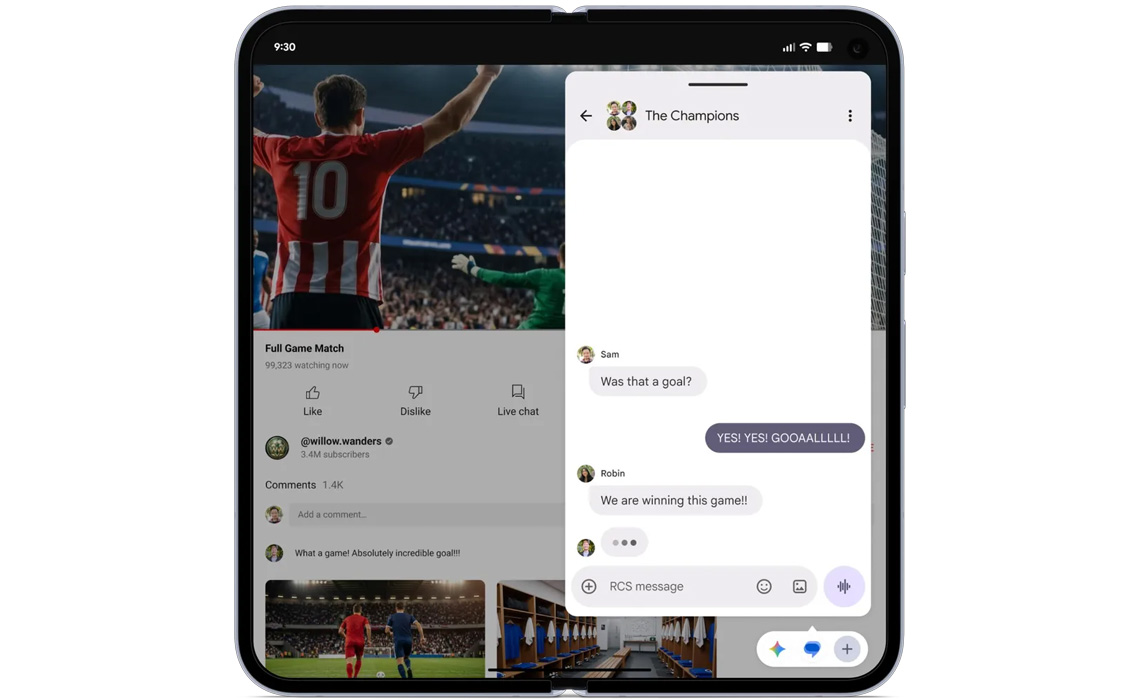
Image: Google
On large-screen devices, a dedicated Bubble Bar at the bottom enables seamless switching, resizing, and full-screen expansion.
| ASO Impact Dimension |
Specific Action Required |
Expected Outcome |
| Keyword Strategy |
Target emerging terms like "floating window," "split screen multitasking," and "productivity booster." |
Capture early search volume before competitors optimize their metadata. |
| Visual Assets |
Upload dedicated screenshots and a preview video showing your app running in Bubble mode. |
Higher Conversion Rate (CVR) on large-screen and foldable devices. |
| Competitive Differentiation |
Call out "Optimized for Android 17 Bubbles" in both your short and long descriptions. |
Stands out to power users searching for advanced multitasking tools. |
For developers in the productivity space, our productivity app marketing solutions can help you align your store presence with these new user expectations and make sure your app captures this emerging traffic.
2. Screen Reactions: Lowering the Barrier for UGC and Viral Marketing
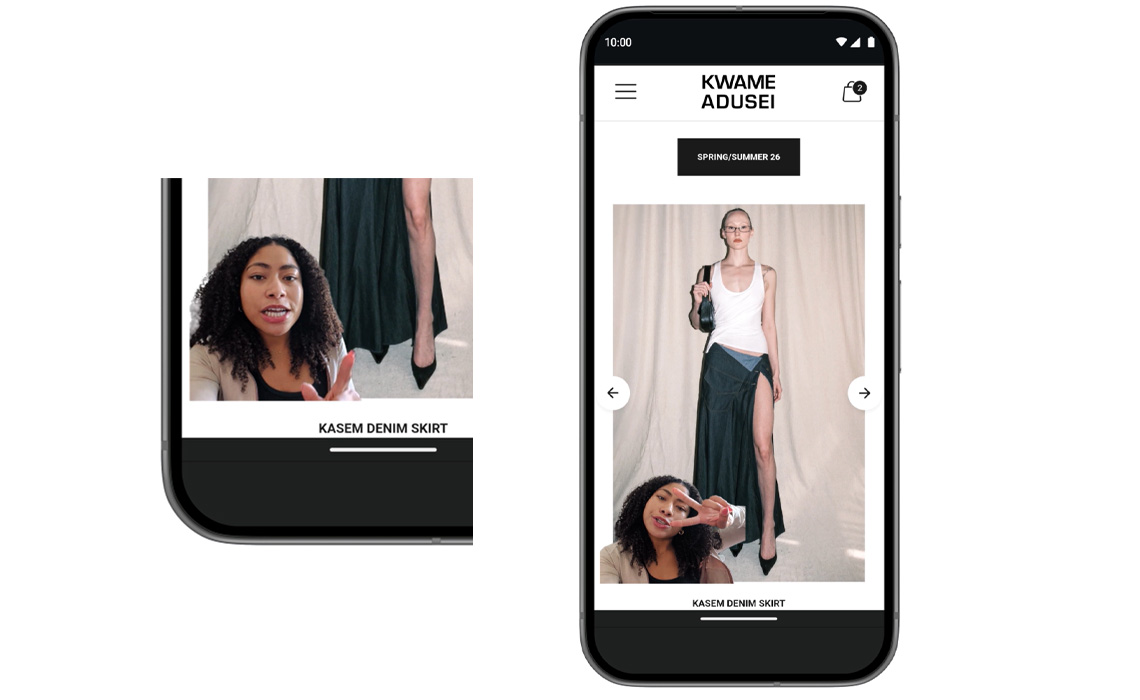
Image: Google
The new Screen Reactions feature lets users record their phone screen and front-facing camera at the same time — no green screen needed.
This makes it easy for users to overlay their reactions and annotations directly onto in-app interactions.
⚡ Expert Tips
- Add a "Record Reaction" Share Button: Make it dead simple for users to capture and share their in-app achievements or standout moments, driving organic brand searches and social media backlinks.
- Refresh Your Preview Video: Use Screen Reactions yourself to create authentic, high-engagement app demo videos for your Google Play Store listing.
- Run UGC Campaigns: Incentivize users to create reaction videos featuring your app, effectively turning your user base into a distributed marketing team.
3. Foldable Gaming Mode: Optimizing for the Next Generation of Devices
As the foldable smartphone market continues to grow, Android 17 introduces a dedicated Foldable Gaming Mode. It features a 50/50 split-screen layout — gameplay on top, dynamic virtual controls on the bottom — along with improved memory management to cut down on frame drops in high-FPS games.

Image: Google
Gaming studios should explore specialized gaming app marketing strategies to maximize visibility on devices like the Galaxy Z Fold, Pixel Fold, and other upcoming foldable hardware. Make sure your app is tagged as foldable-compatible in the Google Play Console, and upload at least three screenshots that showcase the expanded, large-screen experience.
4. Privacy & Security: Trust as a Conversion Driver
Google continues to tighten its privacy framework. Android 17 introduces several critical security enhancements:
- Temporary Location Permissions: Users can now grant one-time or temporary access to precise location data.
- Scoped Contact Sharing: Users can share specific contacts instead of handing over access to their entire address book.
- Enhanced "Mark as Lost" & Live Threat Detection: Stronger biometric locking and real-time interception of suspicious apps.
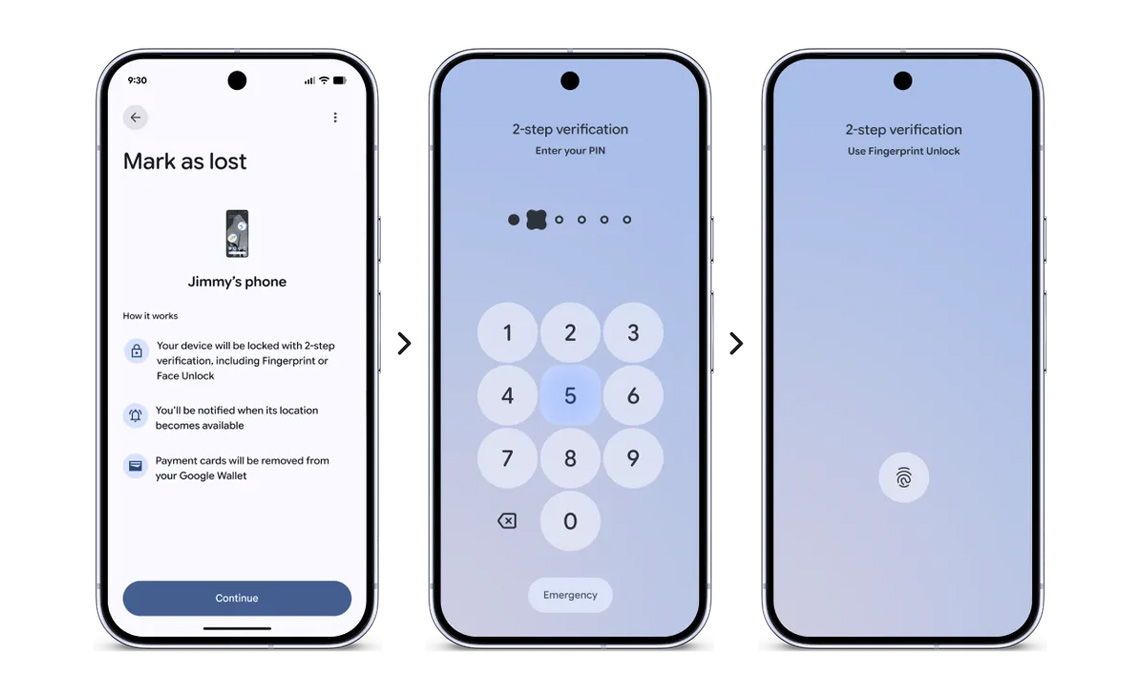
Image: Google
As seen in recent Google Play Store system updates, discovery algorithms are increasingly favoring apps that respect user privacy. Over-requesting permissions remains one of the top drivers of negative reviews. Audit your manifest file, trim any unnecessary permission requests, and call out your privacy-first data practices right in your store description to build user trust and lift conversion rates.
5. Under-the-Hood Updates: Memory Limits & Parental Controls
Android 17 enforces stricter App Memory Limits to stop individual apps from hogging RAM, which improves overall system performance and extends battery life. On top of that, robust Parental Controls are now rolling out across all Android devices — not just Pixel.
Strategic Takeaway: Android 17 isn't just an OS update — it's a shift in how Google Play measures app quality. Performance optimization, privacy compliance, and hardware-specific adaptations (like foldables and bubbles) are no longer nice-to-haves. They're becoming core ASO ranking signals.
For education, gaming, and content apps targeting younger audiences, proactively declaring age ratings and parental control compatibility is now essential for staying visible in family-oriented search queries.
6. Gemini Intelligence: The AI Advantage in App Discovery
Google has confirmed that select advanced devices will receive Gemini Intelligence upgrades later this summer — and that's a massive opportunity for forward-thinking developers.
Apps that integrate Gemini APIs for features like Smart Reply, text summarization, or generative content will deliver a differentiated experience on premium devices. On top of that, nailing keyword research and optimization around emerging AI-related terms will position your app to pull in early adopter traffic. We anticipate Google Play may soon introduce "AI-powered" or "Gemini-ready" filter tags — giving early movers a significant competitive edge.
Android 17 ASO Action Checklist
To make sure your app takes full advantage of these updates, prioritize the following items in your Q3–Q4 2026 marketing roadmap:
| Priority |
Action Item |
Responsible Team |
Expected Impact |
| 🔴 P0 |
Adapt to the Bubbles API and update store screenshots to highlight floating window use cases. |
Product + Design |
Improved CVR on large-screen devices. |
| 🔴 P0 |
Audit and streamline sensitive permissions (location, contacts) to align with the temporary permission model. |
Development |
Fewer negative reviews and reduced compliance risk. |
| 🟡 P1 |
Upload foldable-specific screenshots and confirm the "foldable" tag in Google Play Console. |
Design + ASO |
Capture growing foldable device traffic. |
| 🟡 P1 |
Optimize app memory footprint and monitor background termination rates. |
Development |
Higher user retention and better store ratings. |
| 🟢 P2 |
Plan Gemini API integration and update marketing copy to highlight AI-powered capabilities. |
Product + Marketing |
Future-proofing and stronger differentiation in search results. |
Frequently Asked Questions (FAQs)
How does Android 17 affect Google Play Store rankings?
While Google doesn't publish its exact algorithm, Android 17 puts a clear emphasis on performance, privacy, and hardware optimization. Apps that adapt to new permission models (like temporary location access), optimize for foldable screens, and keep their memory footprint lean are likely to see a boost in search rankings and curated store placements — thanks to stronger user satisfaction and lower crash rates.
Do I need to update my app screenshots for Android 17?
Yes, and it's strongly recommended. If your app supports new features like Bubbles (floating windows) or Foldable Gaming Mode (50/50 split screen), adding dedicated screenshots that showcase those experiences will give your Conversion Rate (CVR) a meaningful lift among users with compatible devices.
What is the impact of temporary location permissions on ASO?
Temporary location permissions reduce friction during onboarding. Users are far more likely to grant access when they know it's not permanent. Highlighting your privacy-first approach and minimal data collection in your app description builds trust — leading to higher download rates and fewer negative reviews calling out privacy concerns.
How can I prepare my app for the Gemini Intelligence rollout?
Start by identifying where AI can genuinely enhance your app's core functionality — think smart summarization, automated replies, or generative features. Begin integrating the Gemini API, and refresh your keyword strategy to include high-intent AI search terms so you're ready to capture early adopter traffic from day one.
Conclusion
Android 17 sets a new standard for app discovery and user engagement. By proactively updating your App Store Optimization strategy to embrace multitasking features, foldable optimization, and tighter privacy standards, you can carve out a real competitive advantage in an increasingly crowded marketplace.
Ready to unlock your app's full potential on Google Play? Partner with a leading app marketing agency and explore our comprehensive ASO services to drive sustainable, organic growth for your app.

 COVID-19 UPDATE